

कोड चलाने की सुविधा की मदद से, मॉडल Python कोड जनरेट और रन कर सकता है. मॉडल, कोड चलाने के नतीजों से बार-बार सीख सकता है. ऐसा तब तक किया जा सकता है, जब तक उसे फ़ाइनल आउटपुट न मिल जाए.
कोड चलाने की सुविधा का इस्तेमाल करके, ऐसी सुविधाएं बनाई जा सकती हैं जिनमें कोड के आधार पर तर्क देने की सुविधा हो और जो टेक्स्ट आउटपुट जनरेट करती हों. उदाहरण के लिए, कोड चलाने की सुविधा का इस्तेमाल करके, समीकरण हल किए जा सकते हैं या टेक्स्ट प्रोसेस किया जा सकता है. कोड चलाने के एनवायरमेंट में शामिल लाइब्रेरी का इस्तेमाल करके, ज़्यादा खास टास्क भी पूरे किए जा सकते हैं.
मॉडल को दी जाने वाली सभी सुविधाओं की तरह, मॉडल यह तय करता है कि कोड चलाने की सुविधा का इस्तेमाल कब करना है.
कोड लागू करने के तरीके पर जाएं
कोड चलाने की सुविधा और फ़ंक्शन कॉल करने की सुविधा की तुलना
कोड चलाने की सुविधा और फ़ंक्शन कॉल करने की सुविधा, दोनों एक जैसी हैं. आम तौर पर, आपको कोड चलाने की सुविधा का इस्तेमाल करना चाहिए. हालांकि, यह इस बात पर निर्भर करता है कि मॉडल आपके इस्तेमाल के उदाहरण को हैंडल कर सकता है या नहीं. कोड चलाने की सुविधा का इस्तेमाल करना भी आसान है, क्योंकि आपको इसे सिर्फ़ चालू करना होता है.
यहां कोड चलाने की सुविधा और फ़ंक्शन कॉल करने की सुविधा के बीच कुछ और अंतर दिए गए हैं:
| कोड चलाने की सुविधा | फ़ंक्शन कॉल करने की सुविधा |
|---|---|
| अगर आपको मॉडल से Python कोड लिखवाना और रन करवाना है, तो कोड चलाने की सुविधा का इस्तेमाल करें. | अगर आपके पास पहले से ही अपने फ़ंक्शन हैं और आपको उन्हें स्थानीय तौर पर रन करना है, तो फ़ंक्शन कॉल करने की सुविधा का इस्तेमाल करें. |
| कोड चलाने की सुविधा की मदद से, मॉडल एपीआई बैकएंड में, अलग-थलग और तय एनवायरमेंट में कोड रन कर सकता है. | फ़ंक्शन कॉल करने की सुविधा की मदद से, मॉडल के अनुरोध किए गए फ़ंक्शन को किसी भी एनवायरमेंट में रन किया जा सकता है. |
| कोड चलाने की सुविधा के लिए, सिर्फ़ एक अनुरोध की ज़रूरत होती है. हालांकि, चैट की सुविधा के साथ कोड चलाने की सुविधा का इस्तेमाल किया जा सकता है. हालांकि, यह ज़रूरी नहीं है. | फ़ंक्शन कॉल करने की सुविधा के लिए, हर फ़ंक्शन कॉल से आउटपुट वापस भेजने के लिए, एक और अनुरोध की ज़रूरत होती है. इसलिए, आपको चैट सुविधा का इस्तेमाल करना होगा. |
इस्तेमाल किए जा सकने वाले मॉडल
gemini-3.1-pro-previewgemini-3-flash-previewgemini-3.1-flash-litegemini-2.5-progemini-2.5-flashgemini-2.5-flash-lite
कोड चलाने की सुविधा का इस्तेमाल करना
कोड चलाने की सुविधा का इस्तेमाल, सिर्फ़ टेक्स्ट वाले और मल्टीमॉडल, दोनों तरह के इनपुट के साथ किया जा सकता है. हालांकि, जवाब हमेशा टेक्स्ट या कोड के तौर पर ही मिलेगा.
शुरू करने से पहले
|
इस पेज पर, अपने प्रोवाइडर के हिसाब से कॉन्टेंट और कोड देखने के लिए, Gemini API उसके नाम पर क्लिक करें. |
अगर आपने अब तक, शुरू करने के लिए
गाइड में दिए गए निर्देशों को पूरा नहीं किया है, तो उन्हें पूरा करें. इसमें बताया गया है कि
Firebase प्रोजेक्ट कैसे सेट अप करें, अपने ऐप्लिकेशन को Firebase से कैसे कनेक्ट करें, SDK कैसे जोड़ें,
अपने चुने हुए Gemini API प्रोवाइडर के लिए बैकएंड सेवा को कैसे शुरू करें, और
GenerativeModel इंस्टेंस कैसे बनाएं.
हम सुझाव देते हैं कि प्रॉम्प्ट की जांच करने और उनमें बदलाव करने के लिए, Google AI Studio का इस्तेमाल करेंGoogle AI Studio.
कोड चलाने की सुविधा चालू करना
|
इस सैंपल को आज़माने से पहले, इस गाइड के
'शुरू करने से पहले' सेक्शन में दिए गए निर्देशों को पूरा करें,
ताकि अपने प्रोजेक्ट और ऐप्लिकेशन को सेट अप किया जा सके. उस सेक्शन में, आपको अपने चुने हुए Gemini API प्रोवाइडर के लिए एक बटन पर भी क्लिक करना होगा, ताकि इस पेज पर आपको प्रोवाइडर के हिसाब से कॉन्टेंट दिखे. |
GenerativeModel इंस्टेंस बनाते समय, CodeExecution को एक टूल के तौर पर शामिल करें, ताकि मॉडल इसका इस्तेमाल करके जवाब जनरेट कर सके. इससे मॉडल, Python कोड जनरेट और रन कर सकता है.
Swift
import FirebaseAILogic

// Initialize the Gemini Developer API backend service
let ai = FirebaseAI.firebaseAI(backend: .googleAI())

// Create a `GenerativeModel` instance with a model that supports your use case
let model = ai.generativeModel(
  modelName: "GEMINI_MODEL_NAME",
  // Provide code execution as a tool that the model can use to generate its response.
  tools: [.codeExecution()]
)

let prompt = """
What is the sum of the first 50 prime numbers?
Generate and run code for the calculation, and make sure you get all 50.
"""

let response = try await model.generateContent(prompt)

guard let candidate = response.candidates.first else {
  print("No candidates in response.")
  return
}
for part in candidate.content.parts {
  if let textPart = part as? TextPart {
    print("Text = \(textPart.text)")
  } else if let executableCode = part as? ExecutableCodePart {
    print("Code = \(executableCode.code), Language = \(executableCode.language)")
  } else if let executionResult = part as? CodeExecutionResultPart {
    print("Outcome = \(executionResult.outcome), Result = \(executionResult.output ?? "no output")")
  }
}
Kotlin
// Initialize the Gemini Developer API backend service
// Create a `GenerativeModel` instance with a model that supports your use case
val model = Firebase.ai(backend = GenerativeBackend.googleAI()).generativeModel(
    modelName = "GEMINI_MODEL_NAME",
    // Provide code execution as a tool that the model can use to generate its response.
    tools = listOf(Tool.codeExecution())
)

val prompt =  "What is the sum of the first 50 prime numbers? " +
        "Generate and run code for the calculation, and make sure you get all 50."

val response = model.generateContent(prompt)

response.candidates.first().content.parts.forEach {
    if(it is TextPart) {
        println("Text = ${it.text}")
    }
    if(it is ExecutableCodePart) {
        println("Code = ${it.code}, Language = ${it.language}")
    }
    if(it is CodeExecutionResultPart) {
       println("Outcome = ${it.outcome}, Result = ${it.output}")
    }
}
Java
// Initialize the Gemini Developer API backend service
// Create a `GenerativeModel` instance with a model that supports your use case
GenerativeModel ai = FirebaseAI.getInstance(GenerativeBackend.googleAI())
                .generativeModel("GEMINI_MODEL_NAME",
                        null,
                        null,
                        // Provide code execution as a tool that the model can use to generate its response.
                        List.of(Tool.codeExecution()));

// Use the GenerativeModelFutures Java compatibility layer which offers
// support for ListenableFuture and Publisher APIs
GenerativeModelFutures model = GenerativeModelFutures.from(ai);

String text = "What is the sum of the first 50 prime numbers? " +
        "Generate and run code for the calculation, and make sure you get all 50.";

Content prompt = new Content.Builder()
    .addText(text)
    .build();

ListenableFuture response = model.generateContent(prompt);

Futures.addCallback(response, new FutureCallback() {
   @Override
public void onSuccess(GenerateContentResponse response)   {
    // Access the first candidate's content parts
    List parts = response.getCandidates().get(0).getContent().getParts();
    for (Part part : parts) {
        if (part instanceof TextPart) {
            TextPart textPart = (TextPart) part;
            System.out.println("Text = " + textPart.getText());
        } else if (part instanceof ExecutableCodePart) {
            ExecutableCodePart codePart = (ExecutableCodePart) part;
            System.out.println("Code = " + codePart.getCode() + ", Language = " + codePart.getLanguage());
        } else if (part instanceof CodeExecutionResultPart) {
            CodeExecutionResultPart resultPart = (CodeExecutionResultPart) part;
            System.out.println("Outcome = " + resultPart.getOutcome() + ", Result = " + resultPart.getOutput());
        }
    }
}

    @Override
    public void onFailure(Throwable t) {
        t.printStackTrace();
    }
}, executor);
Web
import { initializeApp } from "firebase/app";
import { getAI, getGenerativeModel, GoogleAIBackend } from "firebase/ai";

// TODO(developer) Replace the following with your app's Firebase configuration
// See: https://firebase.google.com/docs/web/learn-more#config-object
const firebaseConfig = {
  // ...
};

// Initialize FirebaseApp
const firebaseApp = initializeApp(firebaseConfig);

// Initialize the Gemini Developer API backend service
const ai = getAI(firebaseApp, { backend: new GoogleAIBackend() });

// Create a `GenerativeModel` instance with a model that supports your use case
const model = getGenerativeModel(
  ai,
  {
    model: "GEMINI_MODEL_NAME",
    // Provide code execution as a tool that the model can use to generate its response.
    tools: [{ codeExecution: {} }]
  }
);

const prompt =  "What is the sum of the first 50 prime numbers? " +
        "Generate and run code for the calculation, and make sure you get all 50."

const result = await model.generateContent(prompt);
const response = await result.response;

const parts = response.candidates?.[0].content.parts;

if (parts) {
  parts.forEach((part) => {
    if (part.text) {
        console.log(`Text: ${part.text}`);
    } else if (part.executableCode) {
      console.log(
        `Code: ${part.executableCode.code}, Language: ${part.executableCode.language}`
      );
    } else if (part.codeExecutionResult) {
      console.log(
        `Outcome: ${part.codeExecutionResult.outcome}, Result: ${part.codeExecutionResult.output}`
      );
    }
  });
}
Dart
import 'package:firebase_core/firebase_core.dart';
import 'package:firebase_ai/firebase_ai.dart';
import 'firebase_options.dart';

// Initialize FirebaseApp
await Firebase.initializeApp(
  options: DefaultFirebaseOptions.currentPlatform,
);

// Initialize the Gemini Developer API backend service
// Create a `GenerativeModel` instance with a model that supports your use case
final model = FirebaseAI.googleAI().generativeModel(
  model: 'GEMINI_MODEL_NAME',
  // Provide code execution as a tool that the model can use to generate its response.
  tools: [
    Tool.codeExecution(),
  ],
);

const prompt = 'What is the sum of the first 50 prime numbers? '
    'Generate and run code for the calculation, and make sure you get all 50.';

final response = await model.generateContent([Content.text(prompt)]);

final buffer = StringBuffer();
    for (final part in response.candidates.first.content.parts) {
      if (part is TextPart) {
        buffer.writeln(part.text);
      } else if (part is ExecutableCodePart) {
        buffer.writeln('Executable Code:');
        buffer.writeln('Language: ${part.language}');
        buffer.writeln('Code:');
        buffer.writeln(part.code);
      } else if (part is CodeExecutionResultPart) {
        buffer.writeln('Code Execution Result:');
        buffer.writeln('Outcome: ${part.outcome}');
        buffer.writeln('Output:');
        buffer.writeln(part.output);
      }
    }
Unity
using Firebase;
using Firebase.AI;

// Initialize the Gemini Developer API backend service
var ai = FirebaseAI.GetInstance(FirebaseAI.Backend.GoogleAI());

// Create a `GenerativeModel` instance with a model that supports your use case
var model = ai.GetGenerativeModel(
  modelName: "GEMINI_MODEL_NAME",
  // Provide code execution as a tool that the model can use to generate its response.
  tools: new Tool[] { new Tool(new CodeExecution()) }
);

var prompt = "What is the sum of the first 50 prime numbers? " +
        "Generate and run code for the calculation, and make sure you get all 50.";

var response = await model.GenerateContentAsync(prompt);

foreach (var part in response.Candidates.First().Content.Parts) {
  if (part is ModelContent.TextPart tp) {
    UnityEngine.Debug.Log($"Text = {tp.Text}");
  } else if (part is ModelContent.ExecutableCodePart esp) {
    UnityEngine.Debug.Log($"Code = {esp.Code}, Language = {esp.Language}");
  } else if (part is ModelContent.CodeExecutionResultPart cerp) {
    UnityEngine.Debug.Log($"Outcome = {cerp.Outcome}, Output = {cerp.Output}");
  }
}
अपने इस्तेमाल के उदाहरण और ऐप्लिकेशन के हिसाब से, मॉडल और मॉडल की जगह चुनने का तरीका जानें.
चैट में कोड चलाने की सुविधा का इस्तेमाल करना
कोड चलाने की सुविधा का इस्तेमाल, चैट के हिस्से के तौर पर भी किया जा सकता है:
Swift
import FirebaseAILogic

// Initialize the Gemini Developer API backend service
let ai = FirebaseAI.firebaseAI(backend: .googleAI())

// Create a `GenerativeModel` instance with a model that supports your use case
let model = ai.generativeModel(
  modelName: "GEMINI_MODEL_NAME",
  // Provide code execution as a tool that the model can use to generate its response.
  tools: [.codeExecution()]
)

let prompt = """
What is the sum of the first 50 prime numbers?
Generate and run code for the calculation, and make sure you get all 50.
"""
let chat = model.startChat()

let response = try await chat.sendMessage(prompt)

guard let candidate = response.candidates.first else {
  print("No candidates in response.")
  return
}
for part in candidate.content.parts {
  if let textPart = part as? TextPart {
    print("Text = \(textPart.text)")
  } else if let executableCode = part as? ExecutableCodePart {
    print("Code = \(executableCode.code), Language = \(executableCode.language)")
  } else if let executionResult = part as? CodeExecutionResultPart {
    print("Outcome = \(executionResult.outcome), Result = \(executionResult.output ?? "no output")")
  }
}
Kotlin
// Initialize the Gemini Developer API backend service
// Create a `GenerativeModel` instance with a model that supports your use case
val model = Firebase.ai(backend = GenerativeBackend.googleAI()).generativeModel(
    modelName = "GEMINI_MODEL_NAME",
    // Provide code execution as a tool that the model can use to generate its response.
    tools = listOf(Tool.codeExecution())
)

val prompt =  "What is the sum of the first 50 prime numbers? " +
        "Generate and run code for the calculation, and make sure you get all 50."
val chat = model.startChat()
val response = chat.sendMessage(prompt)

response.candidates.first().content.parts.forEach {
    if(it is TextPart) {
        println("Text = ${it.text}")
    }
    if(it is ExecutableCodePart) {
        println("Code = ${it.code}, Language = ${it.language}")
    }
    if(it is CodeExecutionResultPart) {
       println("Outcome = ${it.outcome}, Result = ${it.output}")
    }
}
Java
// Initialize the Gemini Developer API backend service
// Create a `GenerativeModel` instance with a model that supports your use case
GenerativeModel ai = FirebaseAI.getInstance(GenerativeBackend.googleAI())
                .generativeModel("GEMINI_MODEL_NAME",
                        null,
                        null,
                        // Provide code execution as a tool that the model can use to generate its response.
                        List.of(Tool.codeExecution()));

// Use the GenerativeModelFutures Java compatibility layer which offers
// support for ListenableFuture and Publisher APIs
GenerativeModelFutures model = GenerativeModelFutures.from(ai);
String text = "What is the sum of the first 50 prime numbers? " +
        "Generate and run code for the calculation, and make sure you get all 50.";

Content prompt = new Content.Builder()
    .addText(text)
    .build();

ChatFutures chat = model.startChat();
ListenableFuture response = chat.sendMessage(prompt);

Futures.addCallback(response, new FutureCallback() {
   @Override
public void onSuccess(GenerateContentResponse response)   {
    // Access the first candidate's content parts
    List parts = response.getCandidates().get(0).getContent().getParts();
    for (Part part : parts) {
        if (part instanceof TextPart) {
            TextPart textPart = (TextPart) part;
            System.out.println("Text = " + textPart.getText());
        } else if (part instanceof ExecutableCodePart) {
            ExecutableCodePart codePart = (ExecutableCodePart) part;
            System.out.println("Code = " + codePart.getCode() + ", Language = " + codePart.getLanguage());
        } else if (part instanceof CodeExecutionResultPart) {
            CodeExecutionResultPart resultPart = (CodeExecutionResultPart) part;
            System.out.println("Outcome = " + resultPart.getOutcome() + ", Result = " + resultPart.getOutput());
        }
    }
}

    @Override
    public void onFailure(Throwable t) {
        t.printStackTrace();
    }
}, executor);
Web
import { initializeApp } from "firebase/app";
import { getAI, getGenerativeModel, GoogleAIBackend } from "firebase/ai";

// TODO(developer) Replace the following with your app's Firebase configuration
// See: https://firebase.google.com/docs/web/learn-more#config-object
const firebaseConfig = {
  // ...
};

// Initialize FirebaseApp
const firebaseApp = initializeApp(firebaseConfig);

// Initialize the Gemini Developer API backend service
const ai = getAI(firebaseApp, { backend: new GoogleAIBackend() });

// Create a `GenerativeModel` instance with a model that supports your use case
const model = getGenerativeModel(
  ai,
  {
    model: "GEMINI_MODEL_NAME",
    // Provide code execution as a tool that the model can use to generate its response.
    tools: [{ codeExecution: {} }]
  }
);

const prompt =  "What is the sum of the first 50 prime numbers? " +
        "Generate and run code for the calculation, and make sure you get all 50."
const chat = model.startChat()
const result = await chat.sendMessage(prompt);

const parts = result.response.candidates?.[0].content.parts;

if (parts) {
  parts.forEach((part) => {
    if (part.text) {
        console.log(`Text: ${part.text}`);
    } else if (part.executableCode) {
      console.log(
        `Code: ${part.executableCode.code}, Language: ${part.executableCode.language}`
      );
    } else if (part.codeExecutionResult) {
      console.log(
        `Outcome: ${part.codeExecutionResult.outcome}, Result: ${part.codeExecutionResult.output}`
      );
    }
  });
}
Dart
import 'package:firebase_core/firebase_core.dart';
import 'package:firebase_ai/firebase_ai.dart';
import 'firebase_options.dart';

// Initialize FirebaseApp
await Firebase.initializeApp(
  options: DefaultFirebaseOptions.currentPlatform,
);

// Initialize the Gemini Developer API backend service
// Create a `GenerativeModel` instance with a model that supports your use case
final model = FirebaseAI.googleAI().generativeModel(
  model: 'GEMINI_MODEL_NAME',
  // Provide code execution as a tool that the model can use to generate its response.
  tools: [
    Tool.codeExecution(),
  ],
);

final codeExecutionChat = await model.startChat();

const prompt = 'What is the sum of the first 50 prime numbers? '
    'Generate and run code for the calculation, and make sure you get all 50.';
final response = await codeExecutionChat.sendMessage(Content.text(prompt));

final buffer = StringBuffer();
    for (final part in response.candidates.first.content.parts) {
      if (part is TextPart) {
        buffer.writeln(part.text);
      } else if (part is ExecutableCodePart) {
        buffer.writeln('Executable Code:');
        buffer.writeln('Language: ${part.language}');
        buffer.writeln('Code:');
        buffer.writeln(part.code);
      } else if (part is CodeExecutionResultPart) {
        buffer.writeln('Code Execution Result:');
        buffer.writeln('Outcome: ${part.outcome}');
        buffer.writeln('Output:');
        buffer.writeln(part.output);
      }
    }
Unity
using Firebase;
using Firebase.AI;

// Initialize the Gemini Developer API backend service
var ai = FirebaseAI.GetInstance(FirebaseAI.Backend.GoogleAI());

// Create a `GenerativeModel` instance with a model that supports your use case
var model = ai.GetGenerativeModel(
  modelName: "GEMINI_MODEL_NAME",
  // Provide code execution as a tool that the model can use to generate its response.
  tools: new Tool[] { new Tool(new CodeExecution()) }
);

var prompt = "What is the sum of the first 50 prime numbers? " +
        "Generate and run code for the calculation, and make sure you get all 50.";
var chat = model.StartChat();
var response = await chat.SendMessageAsync(prompt);

foreach (var part in response.Candidates.First().Content.Parts) {
  if (part is ModelContent.TextPart tp) {
    UnityEngine.Debug.Log($"Text = {tp.Text}");
  } else if (part is ModelContent.ExecutableCodePart esp) {
    UnityEngine.Debug.Log($"Code = {esp.Code}, Language = {esp.Language}");
  } else if (part is ModelContent.CodeExecutionResultPart cerp) {
    UnityEngine.Debug.Log($"Outcome = {cerp.Outcome}, Output = {cerp.Output}");
  }
}
अपने इस्तेमाल के उदाहरण और ऐप्लिकेशन के हिसाब से, मॉडल और मॉडल की जगह चुनने का तरीका जानें.
कीमत
कोड चलाने की सुविधा को चालू करने और इसे मॉडल के लिए एक टूल के तौर पर उपलब्ध कराने के लिए, कोई अतिरिक्त शुल्क नहीं लिया जाता. अगर मॉडल, कोड चलाने की सुविधा का इस्तेमाल करता है, तो आपसे इस्तेमाल किए जा रहे Gemini मॉडल के आधार पर, इनपुट और आउटपुट टोकन की मौजूदा दर के हिसाब से शुल्क लिया जाएगा.
नीचे दिए गए डायग्राम में, कोड चलाने की सुविधा के लिए बिलिंग मॉडल दिखाया गया है:
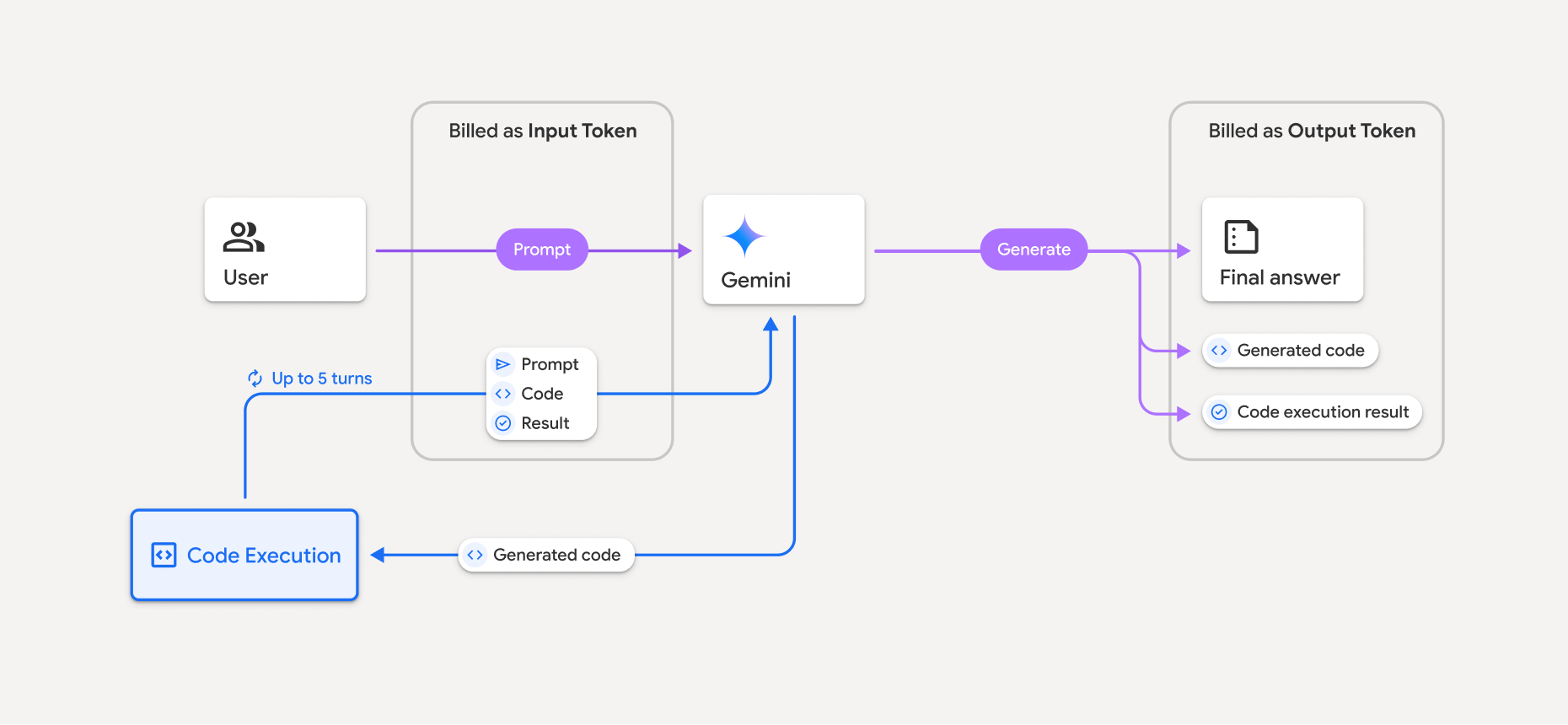
यहां इस बारे में खास जानकारी दी गई है कि मॉडल के कोड चलाने की सुविधा का इस्तेमाल करने पर, टोकन के लिए शुल्क कैसे लिया जाता है:
ओरिजनल प्रॉम्प्ट के लिए, एक बार शुल्क लिया जाता है. इसके टोकन को इंटरमीडिएट टोकन के तौर पर लेबल किया जाता है. इनके लिए, इनपुट टोकन के तौर पर शुल्क लिया जाता है.
जनरेट किए गए कोड और रन किए गए कोड के नतीजे के लिए, इस तरह शुल्क लिया जाता है:
कोड चलाने के दौरान इनका इस्तेमाल करने पर – इन्हें इंटरमीडिएट टोकन के तौर पर लेबल किया जाता है. इनके लिए, इनपुट टोकन के तौर पर शुल्क लिया जाता है.
इन्हें फ़ाइनल जवाब के हिस्से के तौर पर शामिल करने पर – इनके लिए, आउटपुट टोकन के तौर पर शुल्क लिया जाता है.
फ़ाइनल जवाब में मौजूद खास जानकारी के लिए, आउटपुट टोकन के तौर पर शुल्क लिया जाता है.
Gemini API एपीआई के जवाब में इंटरमीडिएट टोकन की संख्या शामिल करता है. इससे आपको पता चलता है कि शुरुआती प्रॉम्प्ट के अलावा, इनपुट टोकन के लिए आपसे शुल्क क्यों लिया जा रहा है.
ध्यान दें कि जनरेट किए गए कोड में, टेक्स्ट और मल्टीमॉडल, दोनों तरह के आउटपुट शामिल हो सकते हैं. जैसे, इमेज.
सीमाएं और सबसे सही तरीके
मॉडल, सिर्फ़ Python कोड जनरेट और रन कर सकता है. यह मीडिया फ़ाइलों जैसे अन्य आर्टफ़ैक्ट नहीं दिखा सकता.
कोड चलाने की सुविधा, टाइम आउट होने से पहले ज़्यादा से ज़्यादा 30 सेकंड तक रन हो सकती है.
कुछ मामलों में, कोड चलाने की सुविधा को चालू करने से, मॉडल के आउटपुट के अन्य हिस्सों में गड़बड़ियां हो सकती हैं. जैसे, कहानी लिखना.
कोड चलाने की सुविधा, इनपुट/आउटपुट के तौर पर फ़ाइल यूआरआई के साथ काम नहीं करती. हालांकि, कोड चलाने की सुविधा, इनलाइन बाइट के तौर पर फ़ाइल इनपुट और ग्राफ़ आउटपुट के साथ काम करती है. इनपुट और आउटपुट की इन सुविधाओं का इस्तेमाल करके, CSV और टेक्स्ट फ़ाइलें अपलोड की जा सकती हैं. साथ ही, इन फ़ाइलों के बारे में सवाल पूछे जा सकते हैं. इसके अलावा, कोड चलाने के नतीजे के तौर पर, Matplotlib ग्राफ़ जनरेट किए जा सकते हैं. इनलाइन बाइट के लिए,
.cpp,.csv,.java,.jpeg,.js,.png,.py,.ts, और.xmlजैसे mime टाइप इस्तेमाल किए जा सकते हैं.
इस्तेमाल की जा सकने वाली लाइब्रेरी
कोड चलाने के एनवायरमेंट में, ये लाइब्रेरी शामिल हैं. अपनी लाइब्रेरी इंस्टॉल नहीं की जा सकतीं.
सुझाव/राय देना या शिकायत करना के बारे में अपने अनुभव के साथ Firebase AI Logic