

Wykonywanie kodu to narzędzie, które umożliwia modelowi generowanie i uruchamianie kodu Pythona. Model może uczyć się iteracyjnie na podstawie wyników wykonywania kodu, aż uzyska ostateczne dane wyjściowe.
Wykonywanie kodu możesz wykorzystać do tworzenia funkcji, które korzystają z rozumowania opartego na kodzie i generują dane wyjściowe w postaci tekstu. Możesz na przykład użyć wykonywania kodu do rozwiązywania równań lub przetwarzania tekstu. Możesz też użyć bibliotek zawartych w środowisku wykonywania kodu do wykonywania bardziej specjalistycznych zadań.
Podobnie jak w przypadku wszystkich narzędzi, które udostępniasz modelowi, model decyduje, kiedy użyć wykonywania kodu.
Porównanie wykonywania kodu z wywoływaniem funkcji
Wykonywanie kodu i wywoływanie funkcji to podobne funkcje. Ogólnie rzecz biorąc, jeśli model może obsłużyć Twój przypadek użycia, lepiej jest używać wykonywania kodu. Wykonywanie kodu jest też prostsze w użyciu, ponieważ wystarczy je włączyć.
Oto kilka dodatkowych różnic między wykonywaniem kodu a wywoływaniem funkcji:
| Wykonywanie kodu | Wywoływanie funkcji |
|---|---|
| Użyj wykonywania kodu, jeśli chcesz, aby model napisał i uruchomił kod Pythona dla Ciebie i zwrócił wynik. | Użyj wywoływania funkcji, jeśli masz już własne funkcje, które chcesz uruchamiać lokalnie. |
| Wykonywanie kodu umożliwia modelowi uruchamianie kodu w backendzie interfejsu API w stałym, izolowanym środowisku. | Wywoływanie funkcji umożliwia uruchamianie funkcji, o które prosi model, w dowolnym środowisku. |
| Wykonywanie kodu odbywa się w ramach jednego żądania. Chociaż możesz opcjonalnie używać wykonywania kodu z funkcją czatu, nie jest to wymagane. | Wywoływanie funkcji wymaga dodatkowego żądania, aby odesłać dane wyjściowe z każdego wywołania funkcji. Dlatego musisz używać funkcji czatu możliwości. |
Obsługiwane modele
gemini-3.1-pro-previewgemini-3-flash-previewgemini-3.1-flash-lite-previewgemini-2.5-progemini-2.5-flashgemini-2.5-flash-lite
Używanie wykonywania kodu
Wykonywanie kodu możesz używać zarówno z danymi wejściowymi zawierającymi tylko tekst, jak i z danymi multimodalnymi, ale odpowiedź będzie zawsze zawierać tylko tekst lub kod.
Zanim zaczniesz
|
Kliknij swojego dostawcę Gemini API, aby wyświetlić na tej stronie treści i kod specyficzne dla dostawcy. |
Jeśli jeszcze tego nie zrobisz, zapoznaj się z
przewodnikiem dla początkujących, w którym opisujemy, jak
skonfigurować projekt w Firebase, połączyć aplikację z Firebase, dodać pakiet SDK, zainicjować usługę backendu dla wybranego dostawcy Gemini API i
utworzyć instancję GenerativeModel.
Do testowania i iterowania promptów zalecamy używanie Google AI Studio.
Włączanie wykonywania kodu
|
Zanim wypróbujesz ten przykład, wykonaj czynności opisane w sekcji
Zanim zaczniesz, aby skonfigurować projekt i aplikację. W tej sekcji klikniesz też przycisk dostawcy, aby na tej stronie wyświetlały się treści specyficzne dla dostawcy.Gemini API |
Gdy tworzysz instancję GenerativeModel, podaj CodeExecution jako narzędzie, którego model może użyć do wygenerowania odpowiedzi. Dzięki temu model może generować i uruchamiać kod Pythona.
Swift
import FirebaseAILogic

// Initialize the Gemini Developer API backend service
let ai = FirebaseAI.firebaseAI(backend: .googleAI())

// Create a `GenerativeModel` instance with a model that supports your use case
let model = ai.generativeModel(
  modelName: "GEMINI_MODEL_NAME",
  // Provide code execution as a tool that the model can use to generate its response.
  tools: [.codeExecution()]
)

let prompt = """
What is the sum of the first 50 prime numbers?
Generate and run code for the calculation, and make sure you get all 50.
"""

let response = try await model.generateContent(prompt)

guard let candidate = response.candidates.first else {
  print("No candidates in response.")
  return
}
for part in candidate.content.parts {
  if let textPart = part as? TextPart {
    print("Text = \(textPart.text)")
  } else if let executableCode = part as? ExecutableCodePart {
    print("Code = \(executableCode.code), Language = \(executableCode.language)")
  } else if let executionResult = part as? CodeExecutionResultPart {
    print("Outcome = \(executionResult.outcome), Result = \(executionResult.output ?? "no output")")
  }
}
Kotlin
// Initialize the Gemini Developer API backend service
// Create a `GenerativeModel` instance with a model that supports your use case
val model = Firebase.ai(backend = GenerativeBackend.googleAI()).generativeModel(
    modelName = "GEMINI_MODEL_NAME",
    // Provide code execution as a tool that the model can use to generate its response.
    tools = listOf(Tool.codeExecution())
)

val prompt =  "What is the sum of the first 50 prime numbers? " +
        "Generate and run code for the calculation, and make sure you get all 50."

val response = model.generateContent(prompt)

response.candidates.first().content.parts.forEach {
    if(it is TextPart) {
        println("Text = ${it.text}")
    }
    if(it is ExecutableCodePart) {
        println("Code = ${it.code}, Language = ${it.language}")
    }
    if(it is CodeExecutionResultPart) {
       println("Outcome = ${it.outcome}, Result = ${it.output}")
    }
}
Java
// Initialize the Gemini Developer API backend service
// Create a `GenerativeModel` instance with a model that supports your use case
GenerativeModel ai = FirebaseAI.getInstance(GenerativeBackend.googleAI())
                .generativeModel("GEMINI_MODEL_NAME",
                        null,
                        null,
                        // Provide code execution as a tool that the model can use to generate its response.
                        List.of(Tool.codeExecution()));

// Use the GenerativeModelFutures Java compatibility layer which offers
// support for ListenableFuture and Publisher APIs
GenerativeModelFutures model = GenerativeModelFutures.from(ai);

String text = "What is the sum of the first 50 prime numbers? " +
        "Generate and run code for the calculation, and make sure you get all 50.";

Content prompt = new Content.Builder()
    .addText(text)
    .build();

ListenableFuture response = model.generateContent(prompt);

Futures.addCallback(response, new FutureCallback() {
   @Override
public void onSuccess(GenerateContentResponse response)   {
    // Access the first candidate's content parts
    List parts = response.getCandidates().get(0).getContent().getParts();
    for (Part part : parts) {
        if (part instanceof TextPart) {
            TextPart textPart = (TextPart) part;
            System.out.println("Text = " + textPart.getText());
        } else if (part instanceof ExecutableCodePart) {
            ExecutableCodePart codePart = (ExecutableCodePart) part;
            System.out.println("Code = " + codePart.getCode() + ", Language = " + codePart.getLanguage());
        } else if (part instanceof CodeExecutionResultPart) {
            CodeExecutionResultPart resultPart = (CodeExecutionResultPart) part;
            System.out.println("Outcome = " + resultPart.getOutcome() + ", Result = " + resultPart.getOutput());
        }
    }
}

    @Override
    public void onFailure(Throwable t) {
        t.printStackTrace();
    }
}, executor);
Web
import { initializeApp } from "firebase/app";
import { getAI, getGenerativeModel, GoogleAIBackend } from "firebase/ai";

// TODO(developer) Replace the following with your app's Firebase configuration
// See: https://firebase.google.com/docs/web/learn-more#config-object
const firebaseConfig = {
  // ...
};

// Initialize FirebaseApp
const firebaseApp = initializeApp(firebaseConfig);

// Initialize the Gemini Developer API backend service
const ai = getAI(firebaseApp, { backend: new GoogleAIBackend() });

// Create a `GenerativeModel` instance with a model that supports your use case
const model = getGenerativeModel(
  ai,
  {
    model: "GEMINI_MODEL_NAME",
    // Provide code execution as a tool that the model can use to generate its response.
    tools: [{ codeExecution: {} }]
  }
);

const prompt =  "What is the sum of the first 50 prime numbers? " +
        "Generate and run code for the calculation, and make sure you get all 50."

const result = await model.generateContent(prompt);
const response = await result.response;

const parts = response.candidates?.[0].content.parts;

if (parts) {
  parts.forEach((part) => {
    if (part.text) {
        console.log(`Text: ${part.text}`);
    } else if (part.executableCode) {
      console.log(
        `Code: ${part.executableCode.code}, Language: ${part.executableCode.language}`
      );
    } else if (part.codeExecutionResult) {
      console.log(
        `Outcome: ${part.codeExecutionResult.outcome}, Result: ${part.codeExecutionResult.output}`
      );
    }
  });
}
Dart
import 'package:firebase_core/firebase_core.dart';
import 'package:firebase_ai/firebase_ai.dart';
import 'firebase_options.dart';

// Initialize FirebaseApp
await Firebase.initializeApp(
  options: DefaultFirebaseOptions.currentPlatform,
);

// Initialize the Gemini Developer API backend service
// Create a `GenerativeModel` instance with a model that supports your use case
final model = FirebaseAI.googleAI().generativeModel(
  model: 'GEMINI_MODEL_NAME',
  // Provide code execution as a tool that the model can use to generate its response.
  tools: [
    Tool.codeExecution(),
  ],
);

const prompt = 'What is the sum of the first 50 prime numbers? '
    'Generate and run code for the calculation, and make sure you get all 50.';

final response = await model.generateContent([Content.text(prompt)]);

final buffer = StringBuffer();
    for (final part in response.candidates.first.content.parts) {
      if (part is TextPart) {
        buffer.writeln(part.text);
      } else if (part is ExecutableCodePart) {
        buffer.writeln('Executable Code:');
        buffer.writeln('Language: ${part.language}');
        buffer.writeln('Code:');
        buffer.writeln(part.code);
      } else if (part is CodeExecutionResultPart) {
        buffer.writeln('Code Execution Result:');
        buffer.writeln('Outcome: ${part.outcome}');
        buffer.writeln('Output:');
        buffer.writeln(part.output);
      }
    }
Unity
using Firebase;
using Firebase.AI;

// Initialize the Gemini Developer API backend service
var ai = FirebaseAI.GetInstance(FirebaseAI.Backend.GoogleAI());

// Create a `GenerativeModel` instance with a model that supports your use case
var model = ai.GetGenerativeModel(
  modelName: "GEMINI_MODEL_NAME",
  // Provide code execution as a tool that the model can use to generate its response.
  tools: new Tool[] { new Tool(new CodeExecution()) }
);

var prompt = "What is the sum of the first 50 prime numbers? " +
        "Generate and run code for the calculation, and make sure you get all 50.";

var response = await model.GenerateContentAsync(prompt);

foreach (var part in response.Candidates.First().Content.Parts) {
  if (part is ModelContent.TextPart tp) {
    UnityEngine.Debug.Log($"Text = {tp.Text}");
  } else if (part is ModelContent.ExecutableCodePart esp) {
    UnityEngine.Debug.Log($"Code = {esp.Code}, Language = {esp.Language}");
  } else if (part is ModelContent.CodeExecutionResultPart cerp) {
    UnityEngine.Debug.Log($"Outcome = {cerp.Outcome}, Output = {cerp.Output}");
  }
}
Dowiedz się, jak wybrać model odpowiednią dla Twojego przypadku użycia i aplikacji.
Używanie wykonywania kodu w czacie
Wykonywanie kodu możesz też używać w ramach czatu:
Swift
import FirebaseAILogic

// Initialize the Gemini Developer API backend service
let ai = FirebaseAI.firebaseAI(backend: .googleAI())

// Create a `GenerativeModel` instance with a model that supports your use case
let model = ai.generativeModel(
  modelName: "GEMINI_MODEL_NAME",
  // Provide code execution as a tool that the model can use to generate its response.
  tools: [.codeExecution()]
)

let prompt = """
What is the sum of the first 50 prime numbers?
Generate and run code for the calculation, and make sure you get all 50.
"""
let chat = model.startChat()

let response = try await chat.sendMessage(prompt)

guard let candidate = response.candidates.first else {
  print("No candidates in response.")
  return
}
for part in candidate.content.parts {
  if let textPart = part as? TextPart {
    print("Text = \(textPart.text)")
  } else if let executableCode = part as? ExecutableCodePart {
    print("Code = \(executableCode.code), Language = \(executableCode.language)")
  } else if let executionResult = part as? CodeExecutionResultPart {
    print("Outcome = \(executionResult.outcome), Result = \(executionResult.output ?? "no output")")
  }
}
Kotlin
// Initialize the Gemini Developer API backend service
// Create a `GenerativeModel` instance with a model that supports your use case
val model = Firebase.ai(backend = GenerativeBackend.googleAI()).generativeModel(
    modelName = "GEMINI_MODEL_NAME",
    // Provide code execution as a tool that the model can use to generate its response.
    tools = listOf(Tool.codeExecution())
)

val prompt =  "What is the sum of the first 50 prime numbers? " +
        "Generate and run code for the calculation, and make sure you get all 50."
val chat = model.startChat()
val response = chat.sendMessage(prompt)

response.candidates.first().content.parts.forEach {
    if(it is TextPart) {
        println("Text = ${it.text}")
    }
    if(it is ExecutableCodePart) {
        println("Code = ${it.code}, Language = ${it.language}")
    }
    if(it is CodeExecutionResultPart) {
       println("Outcome = ${it.outcome}, Result = ${it.output}")
    }
}
Java
// Initialize the Gemini Developer API backend service
// Create a `GenerativeModel` instance with a model that supports your use case
GenerativeModel ai = FirebaseAI.getInstance(GenerativeBackend.googleAI())
                .generativeModel("GEMINI_MODEL_NAME",
                        null,
                        null,
                        // Provide code execution as a tool that the model can use to generate its response.
                        List.of(Tool.codeExecution()));

// Use the GenerativeModelFutures Java compatibility layer which offers
// support for ListenableFuture and Publisher APIs
GenerativeModelFutures model = GenerativeModelFutures.from(ai);
String text = "What is the sum of the first 50 prime numbers? " +
        "Generate and run code for the calculation, and make sure you get all 50.";

Content prompt = new Content.Builder()
    .addText(text)
    .build();

ChatFutures chat = model.startChat();
ListenableFuture response = chat.sendMessage(prompt);

Futures.addCallback(response, new FutureCallback() {
   @Override
public void onSuccess(GenerateContentResponse response)   {
    // Access the first candidate's content parts
    List parts = response.getCandidates().get(0).getContent().getParts();
    for (Part part : parts) {
        if (part instanceof TextPart) {
            TextPart textPart = (TextPart) part;
            System.out.println("Text = " + textPart.getText());
        } else if (part instanceof ExecutableCodePart) {
            ExecutableCodePart codePart = (ExecutableCodePart) part;
            System.out.println("Code = " + codePart.getCode() + ", Language = " + codePart.getLanguage());
        } else if (part instanceof CodeExecutionResultPart) {
            CodeExecutionResultPart resultPart = (CodeExecutionResultPart) part;
            System.out.println("Outcome = " + resultPart.getOutcome() + ", Result = " + resultPart.getOutput());
        }
    }
}

    @Override
    public void onFailure(Throwable t) {
        t.printStackTrace();
    }
}, executor);
Web
import { initializeApp } from "firebase/app";
import { getAI, getGenerativeModel, GoogleAIBackend } from "firebase/ai";

// TODO(developer) Replace the following with your app's Firebase configuration
// See: https://firebase.google.com/docs/web/learn-more#config-object
const firebaseConfig = {
  // ...
};

// Initialize FirebaseApp
const firebaseApp = initializeApp(firebaseConfig);

// Initialize the Gemini Developer API backend service
const ai = getAI(firebaseApp, { backend: new GoogleAIBackend() });

// Create a `GenerativeModel` instance with a model that supports your use case
const model = getGenerativeModel(
  ai,
  {
    model: "GEMINI_MODEL_NAME",
    // Provide code execution as a tool that the model can use to generate its response.
    tools: [{ codeExecution: {} }]
  }
);

const prompt =  "What is the sum of the first 50 prime numbers? " +
        "Generate and run code for the calculation, and make sure you get all 50."
const chat = model.startChat()
const result = await chat.sendMessage(prompt);

const parts = result.response.candidates?.[0].content.parts;

if (parts) {
  parts.forEach((part) => {
    if (part.text) {
        console.log(`Text: ${part.text}`);
    } else if (part.executableCode) {
      console.log(
        `Code: ${part.executableCode.code}, Language: ${part.executableCode.language}`
      );
    } else if (part.codeExecutionResult) {
      console.log(
        `Outcome: ${part.codeExecutionResult.outcome}, Result: ${part.codeExecutionResult.output}`
      );
    }
  });
}
Dart
import 'package:firebase_core/firebase_core.dart';
import 'package:firebase_ai/firebase_ai.dart';
import 'firebase_options.dart';

// Initialize FirebaseApp
await Firebase.initializeApp(
  options: DefaultFirebaseOptions.currentPlatform,
);

// Initialize the Gemini Developer API backend service
// Create a `GenerativeModel` instance with a model that supports your use case
final model = FirebaseAI.googleAI().generativeModel(
  model: 'GEMINI_MODEL_NAME',
  // Provide code execution as a tool that the model can use to generate its response.
  tools: [
    Tool.codeExecution(),
  ],
);

final codeExecutionChat = await model.startChat();

const prompt = 'What is the sum of the first 50 prime numbers? '
    'Generate and run code for the calculation, and make sure you get all 50.';
final response = await codeExecutionChat.sendMessage(Content.text(prompt));

final buffer = StringBuffer();
    for (final part in response.candidates.first.content.parts) {
      if (part is TextPart) {
        buffer.writeln(part.text);
      } else if (part is ExecutableCodePart) {
        buffer.writeln('Executable Code:');
        buffer.writeln('Language: ${part.language}');
        buffer.writeln('Code:');
        buffer.writeln(part.code);
      } else if (part is CodeExecutionResultPart) {
        buffer.writeln('Code Execution Result:');
        buffer.writeln('Outcome: ${part.outcome}');
        buffer.writeln('Output:');
        buffer.writeln(part.output);
      }
    }
Unity
using Firebase;
using Firebase.AI;

// Initialize the Gemini Developer API backend service
var ai = FirebaseAI.GetInstance(FirebaseAI.Backend.GoogleAI());

// Create a `GenerativeModel` instance with a model that supports your use case
var model = ai.GetGenerativeModel(
  modelName: "GEMINI_MODEL_NAME",
  // Provide code execution as a tool that the model can use to generate its response.
  tools: new Tool[] { new Tool(new CodeExecution()) }
);

var prompt = "What is the sum of the first 50 prime numbers? " +
        "Generate and run code for the calculation, and make sure you get all 50.";
var chat = model.StartChat();
var response = await chat.SendMessageAsync(prompt);

foreach (var part in response.Candidates.First().Content.Parts) {
  if (part is ModelContent.TextPart tp) {
    UnityEngine.Debug.Log($"Text = {tp.Text}");
  } else if (part is ModelContent.ExecutableCodePart esp) {
    UnityEngine.Debug.Log($"Code = {esp.Code}, Language = {esp.Language}");
  } else if (part is ModelContent.CodeExecutionResultPart cerp) {
    UnityEngine.Debug.Log($"Outcome = {cerp.Outcome}, Output = {cerp.Output}");
  }
}
Dowiedz się, jak wybrać model odpowiednią dla Twojego przypadku użycia i aplikacji.
Ceny
Włączenie wykonywania kodu i udostępnienie go jako narzędzia dla modelu nie wiąże się z żadnymi dodatkowymi opłatami. Jeśli model zdecyduje się użyć wykonywania kodu, opłata zostanie naliczona według aktualnej stawki za tokeny wejściowe i wyjściowe na podstawie używanego modelu Gemini.
Poniższy diagram przedstawia model rozliczeń za wykonywanie kodu:
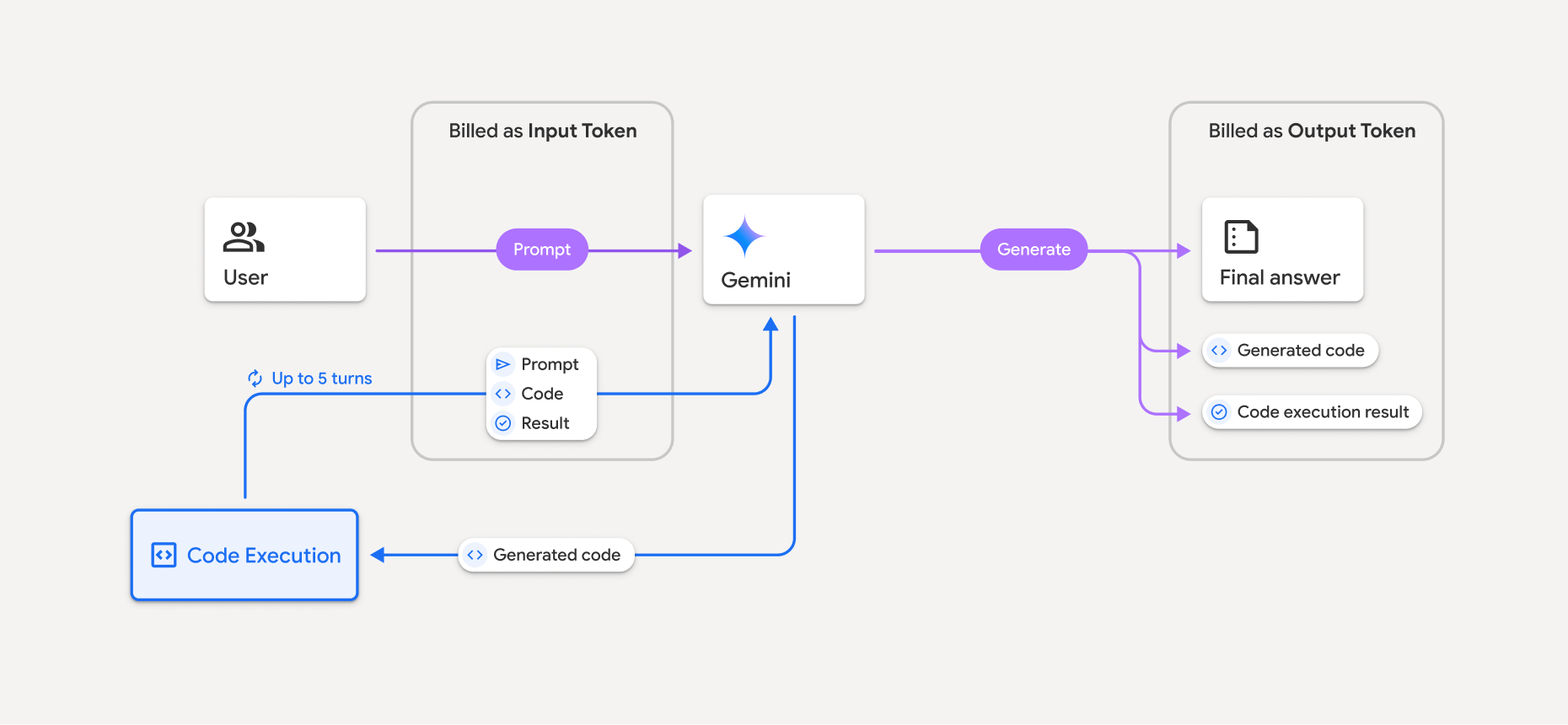
Oto podsumowanie sposobu rozliczania tokenów, gdy model używa wykonywania kodu:
Oryginalny prompt jest rozliczany raz. Jego tokeny są oznaczane jako tokeny pośrednie, które są rozliczane jako tokeny wejściowe.
Wygenerowany kod i wynik wykonania kodu są rozliczane w ten sposób:
Gdy są używane podczas wykonywania kodu – są oznaczane jako tokeny pośrednie, które są rozliczane jako tokeny wejściowe.
Gdy są uwzględniane w odpowiedzi końcowej – są rozliczane jako tokeny wyjściowe.
Podsumowanie końcowe w odpowiedzi końcowej jest rozliczane jako tokeny wyjściowe.
Interfejs Gemini API zawiera w odpowiedzi API liczbę tokenów pośrednich, dzięki czemu wiesz, dlaczego naliczamy opłaty za tokeny wejściowe poza początkowym promptem.
Pamiętaj, że wygenerowany kod może zawierać zarówno tekst, jak i dane wyjściowe multimodalne, np. obrazy.
Ograniczenia i sprawdzone metody
Model może tylko generować i wykonywać kod Pythona. Nie może zwracać innych artefaktów, takich jak pliki multimedialne.
Wykonywanie kodu może trwać maksymalnie 30 sekund, zanim upłynie limit czasu.
W niektórych przypadkach włączenie wykonywania kodu może prowadzić do regresji w innych obszarach danych wyjściowych modelu (np. w pisaniu opowieści).
Narzędzie do wykonywania kodu nie obsługuje identyfikatorów URI plików jako danych wejściowych ani wyjściowych. Obsługuje jednak dane wejściowe plików i dane wyjściowe wykresów jako wbudowane bajty. Dzięki tym funkcjom wejścia i wyjścia możesz przesyłać pliki CSV i tekstowe, zadawać pytania dotyczące tych plików oraz generować wykresy Matplotlib w ramach wyniku wykonywania kodu. Obsługiwane typy MIME dla wbudowanych bajtów to
.cpp,.csv,.java,.jpeg,.js,.png,.py,.tsi.xml.
Obsługiwane biblioteki
Środowisko wykonywania kodu zawiera te biblioteki. Nie możesz instalować własnych bibliotek.
Prześlij opinię o korzystaniu z Firebase AI Logic