

Grounding z użyciem
Grounding z użyciem
- Zwiększenie dokładności faktów: zmniejsz halucynacje modelu, opierając odpowiedzi na informacjach ze świata rzeczywistego.
- Dostęp do informacji w czasie rzeczywistym: odpowiadaj na pytania dotyczące najnowszych wydarzeń i tematów.
- Podawanie źródeł: buduj zaufanie użytkowników lub umożliwiaj im przeglądanie odpowiednich witryn, pokazując źródła twierdzeń modelu.
- Wykonywanie bardziej złożonych zadań: pobieraj artefakty i odpowiednie obrazy, filmy lub inne multimedia, aby ułatwić zadania związane z rozumowaniem.
- Ulepszanie odpowiedzi dotyczących regionu lub języka: znajdź informacje dotyczące regionu lub pomóż w dokładnym tłumaczeniu treści.
Obsługiwane modele
gemini-3.1-pro-previewgemini-3-flash-previewgemini-3.1-flash-lite-previewgemini-3-pro-image-preview(znany też jako „Nano Banana Pro”)gemini-3.1-flash-image-preview(znany też jako „Nano Banana 2”)gemini-2.5-progemini-2.5-flashgemini-2.5-flash-lite
Obsługiwane języki
Zobacz obsługiwane języki w przypadku Gemini modeli.
Grounding modelu za pomocą Google Search
|
Kliknij swojego dostawcę Gemini API, aby wyświetlić na tej stronie treści i kod specyficzne dla dostawcy. |
Gdy tworzysz instancję GenerativeModel, podaj GoogleSearch jako tool, którego model może używać do generowania odpowiedzi.
Swift
import FirebaseAILogic

// Initialize the Gemini Developer API backend service
let ai = FirebaseAI.firebaseAI(backend: .googleAI())

// Create a `GenerativeModel` instance with a model that supports your use case
let model = ai.generativeModel(
    modelName: "GEMINI_MODEL_NAME",
    // Provide Google Search as a tool that the model can use to generate its response
    tools: [Tool.googleSearch()]
)

let response = try await model.generateContent("Who won the euro 2024?")
print(response.text ?? "No text in response.")

// Make sure to comply with the "Grounding with Google Search" usage requirements,
// which includes how you use and display the grounded result
Kotlin
// Initialize the Gemini Developer API backend service
// Create a `GenerativeModel` instance with a model that supports your use case
val model = Firebase.ai(backend = GenerativeBackend.googleAI()).generativeModel(
    modelName = "GEMINI_MODEL_NAME",
    // Provide Google Search as a tool that the model can use to generate its response
    tools = listOf(Tool.googleSearch())
)

val response = model.generateContent("Who won the euro 2024?")
print(response.text)

// Make sure to comply with the "Grounding with Google Search" usage requirements,
// which includes how you use and display the grounded result
Java
// Initialize the Gemini Developer API backend service
// Create a `GenerativeModel` instance with a model that supports your use case
GenerativeModel ai = FirebaseAI.getInstance(GenerativeBackend.googleAI())
                .generativeModel("GEMINI_MODEL_NAME",
                        null,
                        null,
                        // Provide Google Search as a tool that the model can use to generate its response
                        List.of(Tool.GoogleSearch()));

// Use the GenerativeModelFutures Java compatibility layer which offers
// support for ListenableFuture and Publisher APIs
GenerativeModelFutures model = GenerativeModelFutures.from(ai);

ListenableFuture response = model.generateContent("Who won the euro 2024?");
  Futures.addCallback(response, new FutureCallback() {
      @Override
      public void onSuccess(GenerateContentResponse result) {
          String resultText = result.getText();
          System.out.println(resultText);
      }

      @Override
      public void onFailure(Throwable t) {
          t.printStackTrace();
      }
  }, executor);

// Make sure to comply with the "Grounding with Google Search" usage requirements,
// which includes how you use and display the grounded result
Web
import { initializeApp } from "firebase/app";
import { getAI, getGenerativeModel, GoogleAIBackend } from "firebase/ai";

// TODO(developer) Replace the following with your app's Firebase configuration
// See: https://firebase.google.com/docs/web/learn-more#config-object
const firebaseConfig = {
  // ...
};

// Initialize FirebaseApp
const firebaseApp = initializeApp(firebaseConfig);

// Initialize the Gemini Developer API backend service
const ai = getAI(firebaseApp, { backend: new GoogleAIBackend() });

// Create a `GenerativeModel` instance with a model that supports your use case
const model = getGenerativeModel(
  ai,
  {
    model: "GEMINI_MODEL_NAME",
    // Provide Google Search as a tool that the model can use to generate its response
    tools: [{ googleSearch: {} }]
  }
);

const result = await model.generateContent("Who won the euro 2024?");

console.log(result.response.text());

// Make sure to comply with the "Grounding with Google Search" usage requirements,
// which includes how you use and display the grounded result
Dart
import 'package:firebase_core/firebase_core.dart';
import 'package:firebase_ai/firebase_ai.dart';
import 'firebase_options.dart';

// Initialize FirebaseApp
await Firebase.initializeApp(
  options: DefaultFirebaseOptions.currentPlatform,
);

// Initialize the Gemini Developer API backend service
// Create a `GenerativeModel` instance with a model that supports your use case
final model = FirebaseAI.googleAI().generativeModel(
  model: 'GEMINI_MODEL_NAME',
  // Provide Google Search as a tool that the model can use to generate its response
  tools: [
    Tool.googleSearch(),
  ],
);

final response = await model.generateContent([Content.text("Who won the euro 2024?")]);
print(response.text);

// Make sure to comply with the "Grounding with Google Search" usage requirements,
// which includes how you use and display the grounded result
Unity
using Firebase;
using Firebase.AI;

// Initialize the Gemini Developer API backend service
var ai = FirebaseAI.GetInstance(FirebaseAI.Backend.GoogleAI());

// Create a `GenerativeModel` instance with a model that supports your use case
var model = ai.GetGenerativeModel(
  modelName: "GEMINI_MODEL_NAME",
  // Provide Google Search as a tool that the model can use to generate its response
  tools: new[] { new Tool(new GoogleSearch()) }
);

var response = await model.GenerateContentAsync("Who won the euro 2024?");
UnityEngine.Debug.Log(response.Text ?? "No text in response.");

// Make sure to comply with the "Grounding with Google Search" usage requirements,
// which includes how you use and display the grounded result
Dowiedz się, jak wybrać model odpowiednią do Twojego przypadku użycia i aplikacji.
Aby uzyskać optymalne wyniki, użyj temperatury 1.0 (która jest domyślną wartością dla wszystkich modeli 2.5). Dowiedz się, jak ustawić temperaturę w
konfiguracji modelu.
Jak działa grounding z użyciem Google Search
Gdy używasz narzędzia GoogleSearch, model automatycznie obsługuje cały proces wyszukiwania, przetwarzania i cytowania informacji.
Tak wygląda proces działania modelu:
- Otrzymywanie promptu: Twoja aplikacja wysyła prompt do modelu Gemini
z włączonym narzędziem
GoogleSearch. - Analizowanie promptu: model analizuje prompt i określa, czy
Google Search może ulepszyć jego odpowiedź. - Wysyłanie zapytań do
Google Search : w razie potrzeby model automatycznie generuje co najmniej 1 zapytanie i je wykonuje. - Przetwarzanie wyników wyszukiwania: model przetwarza wyniki
Google Search i formułuje odpowiedź na pierwotny prompt. - Zwracanie „wyniku opartego na źródłach”: model zwraca ostateczną, przyjazną dla użytkownika
odpowiedź opartą na
Google Search wynikach. Ta odpowiedź zawiera tekstową odpowiedź modelu orazgroundingMetadataz zapytaniami, wynikami wyszukiwania i źródłami.
Pamiętaj, że udostępnienie groundingMetadata, a więc nie będzie „wynikiem opartym na źródłach”.
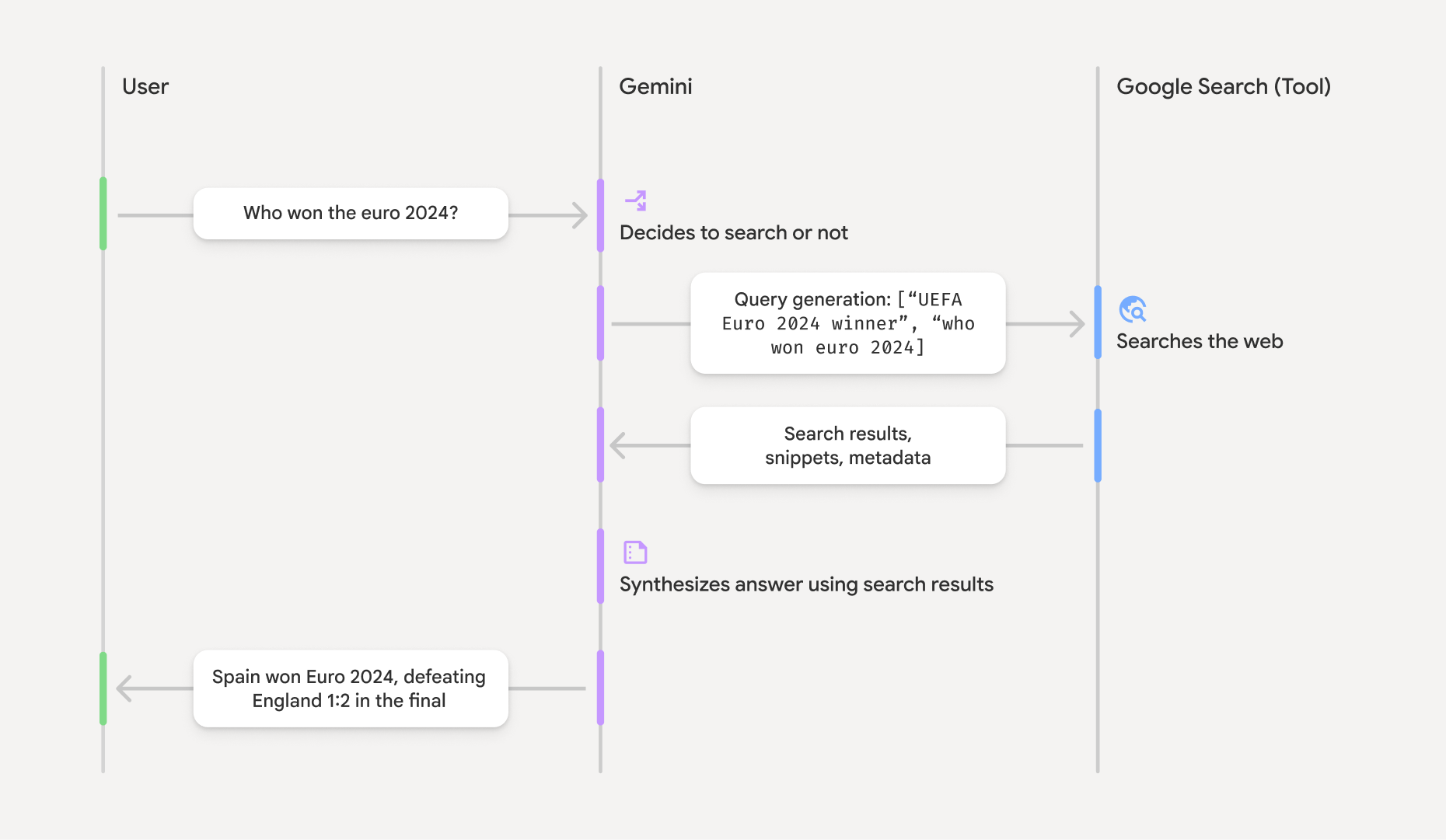
Interpretowanie wyniku opartego na źródłach
Jeśli model opiera swoją odpowiedź na wynikach groundingMetadata, który zawiera uporządkowane dane niezbędne do weryfikowania twierdzeń i tworzenia w aplikacji bogatego środowiska źródłowego.
Obiekt groundingMetadata w „wyniku opartym na źródłach” zawiera te informacje:
webSearchQueries: tablica zapytań wysłanych doGoogle Search . Te informacje są przydatne do debugowania i zrozumienia procesu rozumowania modelu.searchEntryPoint: zawiera kod HTML i CSS do renderowania wymaganych "Google Search sugestii". Musisz przestrzegać wymagań dotyczących korzystania z funkcji "Grounding z użyciemGoogle Search " w przypadku wybranego dostawcy interfejsu API: Gemini Developer API lub Vertex AI Gemini API (patrz Warunki korzystania z usługi sekcja w Szczegółowych warunkach korzystania z usługi). Więcej informacji o tym, jak używać i wyświetlać wynik oparty na źródłach , znajdziesz w dalszej części tej strony.groundingChunks: tablica obiektów zawierających źródła internetowe (uriititle).groundingSupports: tablica fragmentów, które łączą odpowiedź modelutextze źródłami wgroundingChunks. Każdy fragment łączysegmenttekstu (zdefiniowany przezstartIndexiendIndex) z co najmniej 1 elementemgroundingChunkIndices. To pole pomaga tworzyć linki do źródeł w tekście. Więcej informacji o tym, jak używać i wyświetlać wynik oparty na źródłach , znajdziesz w dalszej części tej strony.
Oto przykładowa odpowiedź, która zawiera obiekt groundingMetadata:
{
  "candidates": [
    {
      "content": {
        "parts": [
          {
            "text": "Spain won Euro 2024, defeating England 2-1 in the final. This victory marks Spain's record fourth European Championship title."
          }
        ],
        "role": "model"
      },
      "groundingMetadata": {
        "webSearchQueries": [
          "UEFA Euro 2024 winner",
          "who won euro 2024"
        ],
        "searchEntryPoint": {
          "renderedContent": "<!-- HTML and CSS for the search widget -->"
        },
        "groundingChunks": [
          {"web": {"uri": "https://vertexaisearch.cloud.google.com.....", "title": "aljazeera.com"}},
          {"web": {"uri": "https://vertexaisearch.cloud.google.com.....", "title": "uefa.com"}}
        ],
        "groundingSupports": [
          {
            "segment": {"startIndex": 0, "endIndex": 85, "text": "Spain won Euro 2024, defeatin..."},
            "groundingChunkIndices": [0]
          },
          {
            "segment": {"startIndex": 86, "endIndex": 210, "text": "This victory marks Spain's..."},
            "groundingChunkIndices": [0, 1]
          }
        ]
      }
    }
  ]
}
Używanie i wyświetlanie wyniku opartego na źródłach
Jeśli model używa narzędzia groundingMetadata.
Wyświetlanie
Oprócz spełnienia wymagań dotyczących korzystania z narzędzia
(Wymagane) Wyświetlanie Google Search sugestii
Jeśli odpowiedź zawiera „sugestie
Obiekt groundingMetadata zawiera „searchEntryPoint, które ma pole renderedContent
zawierające zgodny kod HTML i CSS, które musisz zaimplementować, aby
wyświetlać sugestie wyszukiwania w swojej aplikacji.
Szczegółowe informacje o
wymaganiach dotyczących
Przykłady kodu znajdziesz w dalszej części tej sekcji.
(Wymagane) Wyświetlanie źródeł
Obiekt groundingMetadata zawiera uporządkowane dane źródłowe, a konkretnie pola groundingSupports i groundingChunks. Użyj tych informacji, aby połączyć stwierdzenia modelu bezpośrednio z ich źródłami w interfejsie (w tekście i zbiorczo).
Przykłady kodu znajdziesz w dalszej części tej sekcji.
Przykłady kodu
Te przykłady kodu przedstawiają ogólne wzorce używania i wyświetlania wyniku opartego na źródłach. Twoim obowiązkiem jest jednak dopilnowanie, aby Twoja implementacja była zgodna z wymaganiami.
Swift
// ...

// Get the model's response
let text = response.text

// Get the grounding metadata
if let candidate = response.candidates.first,
   let groundingMetadata = candidate.groundingMetadata {
  // REQUIRED - display Google Search suggestions
  // (renderedContent contains HTML and CSS for the search widget)
  if let renderedContent = groundingMetadata.searchEntryPoint?.renderedContent {
    // TODO(developer): Display Google Search suggestions using a WebView
  }

  // REQUIRED - display sources
  let groundingChunks = groundingMetadata.groundingChunks
  for chunk in groundingMetadata.groundingChunks {
    if let web = chunk.web {
      let title = web.title  // for example, "uefa.com"
      let uri = web.uri  // for example, "https://vertexaisearch.cloud.google.com..."
      // TODO(developer): show source in the UI
    }
  }
}
Kotlin
// ...

// Get the model's response
val text = response.text

// Get the grounding metadata
val groundingMetadata = response.candidates.firstOrNull()?.groundingMetadata

// REQUIRED - display Google Search suggestions
// (renderedContent contains HTML and CSS for the search widget)
val renderedContent = groundingMetadata?.searchEntryPoint?.renderedContent
if (renderedContent != null) {
    // TODO(developer): Display Google Search suggestions using a WebView
}

// REQUIRED - display sources
val groundingChunks = groundingMetadata?.groundingChunks
groundingChunks?.let { chunks ->
  for (chunk in chunks) {
  	val title = chunk.web?.title  // for example, "uefa.com"
	val uri = chunk.web?.uri  // for example, "https://vertexaisearch.cloud.google.com..."
// TODO(developer): show source in the UI
  }
}
Java
// ...

Futures.addCallback(response, new FutureCallback() {
  @Override
  public void onSuccess(GenerateContentResponse result) {
  // Get the model's response
  String text = result.getText();

  // Get the grounding metadata
  GroundingMetadata groundingMetadata =
  result.getCandidates()[0].getGroundingMetadata();

  if (groundingMetadata != null) {
    // REQUIRED - display Google Search suggestions
  // (renderedContent contains HTML and CSS for the search widget)
    String renderedContent =
  groundingMetadata.getSearchEntryPoint().getRenderedContent();
    if (renderedContent != null) {
      // TODO(developer): Display Google Search suggestions using a WebView
    }

    // REQUIRED - display sources
    List chunks = groundingMetadata.getGroundingChunks();
    if (chunks != null) {
      for(GroundingChunk chunk : chunks) {
        WebGroundingChunk web = chunk.getWeb();
        if (web != null) {
          String title = web.getTitle();  // for example, "uefa.com"
          String uri = web.getUri();  // for example, "https://vertexaisearch.cloud.google.com..."
          // TODO(developer): show sources in the UI
        }
      }
    }
  }
  }

  @Override
  public void onFailure(Throwable t) {
  t.printStackTrace();
  }
  }, executor);
Web
// ...

// Get the model's text response
const text = result.response.text();

// Get the grounding metadata
const groundingMetadata = result.response.candidates?.[0]?.groundingMetadata;

// REQUIRED - display Google Search suggestions
// (renderedContent contains HTML and CSS for the search widget)
const renderedContent = groundingMetadata?.searchEntryPoint?.renderedContent;
if (renderedContent) {
  // TODO(developer): render this HTML and CSS in the UI
}

// REQUIRED - display sources
const groundingChunks = groundingMetadata?.groundingChunks;
if (groundingChunks) {
  for (const chunk of groundingChunks) {
    const title = chunk.web?.title;  // for example, "uefa.com"
    const uri = chunk.web?.uri;  // for example, "https://vertexaisearch.cloud.google.com..."
    // TODO(developer): show sources in the UI
  }
}
Dart
// ...

// Get the model's response
final text = response.text;

// Get the grounding metadata
final groundingMetadata = response.candidates.first.groundingMetadata;

// REQUIRED - display Google Search suggestions
// (renderedContent contains HTML and CSS for the search widget)
final renderedContent = groundingMetadata?.searchEntryPoint?.renderedContent;
if (renderedContent != null) {
    // TODO(developer): Display Google Search suggestions using a WebView
}

// REQUIRED - display sources
final groundingChunks = groundingMetadata?.groundingChunks;
if (groundingChunks != null) {
  for (var chunk in groundingChunks) {
    final title = chunk.web?.title;  // for example, "uefa.com"
    final uri = chunk.web?.uri;  // for example, "https://vertexaisearch.cloud.google.com..."
    // TODO(developer): show sources in the UI
  }
}
Unity
// ...

// Get the model's response
var text = response.Text;

// Get the grounding metadata
var groundingMetadata = response.Candidates.First().GroundingMetadata.Value;

// REQUIRED - display Google Search suggestions
// (renderedContent contains HTML and CSS for the search widget)
if (groundingMetadata.SearchEntryPoint.HasValue) {
    var renderedContent = groundingMetadata.SearchEntryPoint.Value.RenderedContent;
    // TODO(developer): Display Google Search suggestions using a WebView
}

// REQUIRED - display sources
foreach(GroundingChunk chunk in groundingMetadata.GroundingChunks) {
    var title = chunk.Web.Value.Title;  // for example, "uefa.com"
    var uri = chunk.Web.Value.Uri;  // for example, "https://vertexaisearch.cloud.google.com..."
    // TODO(developer): show sources in the UI
}
Wyniki oparte na faktach i monitorowanie wykorzystania AI w konsoli Firebase
Jeśli włączysz monitorowanie wykorzystania AI w konsoliFirebase, odpowiedzi będą przechowywane w Cloud Logging. Domyślnie te dane mają 30-dniowy okres przechowywania.
Twoim obowiązkiem jest dopilnowanie, aby ten okres przechowywania lub dowolny niestandardowy okres ustawiony przez Ciebie był w pełni zgodny z Twoim konkretnym przypadkiem użycia i wszelkimi dodatkowymi wymaganiami dotyczącymi zgodności w przypadku wybranego Gemini API dostawcy: Gemini Developer API lub Vertex AI Gemini API (patrz sekcja Warunki korzystania z usługi w Szczegółowych warunkach korzystania z usługi). Aby spełnić te wymagania, może być konieczne dostosowanie okresu przechowywania w Cloud Logging.
Ceny i limity
Zapoznaj się z cenami, dostępnością modelu i limitami dotyczącymi oparcia na faktach z użyciem