

O embasamento com o
O embasamento com
- Aumentar a acurácia factual: reduza as alucinações do modelo embasando as respostas em informações do mundo real.
- Acessar informações em tempo real: responda a perguntas sobre eventos e temas recentes.
- Fornecer fontes: para aumentar a confiança do usuário ou permitir que ele navegue por sites relevantes, mostre as fontes das declarações do modelo.
- Conclua tarefas mais complexas: recupere artefatos e imagens, vídeos ou outras mídias relevantes para ajudar em tarefas de raciocínio.
- Melhorar respostas específicas de região ou idioma: encontre informações específicas de região ou ajude a traduzir conteúdo com precisão.
Modelos compatíveis
gemini-3.1-pro-previewgemini-3.8-flash(e as mais antigasgemini-3.7-flash,gemini-3.6-flashegemini-3.5-flash)gemini-3.5-flash-lite(e agemini-3.1-flash-litemais antiga)gemini-3-pro-image(conhecido como "Nano Banana Pro")gemini-3.1-flash-image(também conhecido como "Nano Banana 2")
Os modelos Gemini 2.5 de uso geral oferecem suporte a esse recurso, mas foram descontinuados.
Os modelos Gemini Live API também oferecem suporte a esse recurso, mas todos os exemplos de código neste guia são para os modelos Gemini de uso geral.
Idiomas compatíveis
Consulte os idiomas disponíveis para modelos Gemini.
Basear o modelo em Google Search
|
Clique no seu provedor de Gemini API para conferir o conteúdo e o código específicos do provedor nesta página. |
Ao criar a instância GenerativeModel, forneça GoogleSearch como um
tool que o modelo pode usar para gerar a resposta.
Swift
import FirebaseAILogic

// Initialize the Gemini Developer API backend service.
let ai = FirebaseAI.firebaseAI(backend: .googleAI())

// Create a `GenerativeModel` instance with a model that supports your use case.
let model = ai.generativeModel(
    modelName: "GEMINI_MODEL_NAME",
    // Provide Google Search as a tool that the model can use to generate its response.
    tools: [Tool.googleSearch()]
)

let response = try await model.generateContent("Who won the euro 2024?")
print(response.text ?? "No text in response.")

// Make sure to comply with the "Grounding with Google Search" usage requirements,
// which includes how you use and display the grounded result
Kotlin
// Initialize the Gemini Developer API backend service.
// Create a `GenerativeModel` instance with a model that supports your use case.
val model = Firebase.ai(backend = GenerativeBackend.googleAI()).generativeModel(
    modelName = "GEMINI_MODEL_NAME",
    // Provide Google Search as a tool that the model can use to generate its response
    tools = listOf(Tool.googleSearch())
)

val response = model.generateContent("Who won the euro 2024?")
print(response.text)

// Make sure to comply with the "Grounding with Google Search" usage requirements,
// which includes how you use and display the grounded result
Java
// Initialize the Gemini Developer API backend service.
// Create a `GenerativeModel` instance with a model that supports your use case.
GenerativeModel ai = FirebaseAI.getInstance(GenerativeBackend.googleAI())
                .generativeModel("GEMINI_MODEL_NAME",
                        null,
                        null,
                        // Provide Google Search as a tool that the model can use to generate its response
                        List.of(Tool.GoogleSearch()));

// Use the GenerativeModelFutures Java compatibility layer which offers
// support for ListenableFuture and Publisher APIs
GenerativeModelFutures model = GenerativeModelFutures.from(ai);

ListenableFuture response = model.generateContent("Who won the euro 2024?");
  Futures.addCallback(response, new FutureCallback() {
      @Override
      public void onSuccess(GenerateContentResponse result) {
          String resultText = result.getText();
          System.out.println(resultText);
      }

      @Override
      public void onFailure(Throwable t) {
          t.printStackTrace();
      }
  }, executor);

// Make sure to comply with the "Grounding with Google Search" usage requirements,
// which includes how you use and display the grounded result
Web
import { initializeApp } from "firebase/app";
import { getAI, getGenerativeModel, GoogleAIBackend } from "firebase/ai";

// TODO(developer): Replace the following with your app's Firebase configuration
// See: https://firebase.google.com/docs/web/learn-more#config-object
const firebaseConfig = {
  // ...
};

// Initialize FirebaseApp
const firebaseApp = initializeApp(firebaseConfig);

// Initialize the Gemini Developer API backend service.
const ai = getAI(firebaseApp, { backend: new GoogleAIBackend() });

// Create a `GenerativeModel` instance with a model that supports your use case.
const model = getGenerativeModel(
  ai,
  {
    model: "GEMINI_MODEL_NAME",
    // Provide Google Search as a tool that the model can use to generate its response
    tools: [{ googleSearch: {} }]
  }
);

const result = await model.generateContent("Who won the euro 2024?");

console.log(result.response.text());

// Make sure to comply with the "Grounding with Google Search" usage requirements,
// which includes how you use and display the grounded result
Dart
import 'package:firebase_core/firebase_core.dart';
import 'package:firebase_ai/firebase_ai.dart';
import 'firebase_options.dart';

// Initialize FirebaseApp.
await Firebase.initializeApp(
  options: DefaultFirebaseOptions.currentPlatform,
);

// Initialize the Gemini Developer API backend service.
// Create a `GenerativeModel` instance with a model that supports your use case.
final model = FirebaseAI.googleAI().generativeModel(
  model: 'GEMINI_MODEL_NAME',
  // Provide Google Search as a tool that the model can use to generate its response.
  tools: [
    Tool.googleSearch(),
  ],
);

final response = await model.generateContent([Content.text("Who won the euro 2024?")]);
print(response.text);

// Make sure to comply with the "Grounding with Google Search" usage requirements,
// which includes how you use and display the grounded result
Unity
using Firebase;
using Firebase.AI;

// Initialize the Gemini Developer API backend service.
var ai = FirebaseAI.GetInstance(FirebaseAI.Backend.GoogleAI());

// Create a `GenerativeModel` instance with a model that supports your use case.
var model = ai.GetGenerativeModel(
  modelName: "GEMINI_MODEL_NAME",
  // Provide Google Search as a tool that the model can use to generate its response.
  tools: new[] { new Tool(new GoogleSearch()) }
);

var response = await model.GenerateContentAsync("Who won the euro 2024?");
UnityEngine.Debug.Log(response.Text ?? "No text in response.");

// Make sure to comply with the "Grounding with Google Search" usage requirements,
// which includes how you use and display the grounded result
Saiba como escolher um modelo adequado para seu caso de uso e app.
Como o embasamento com o Google Search funciona
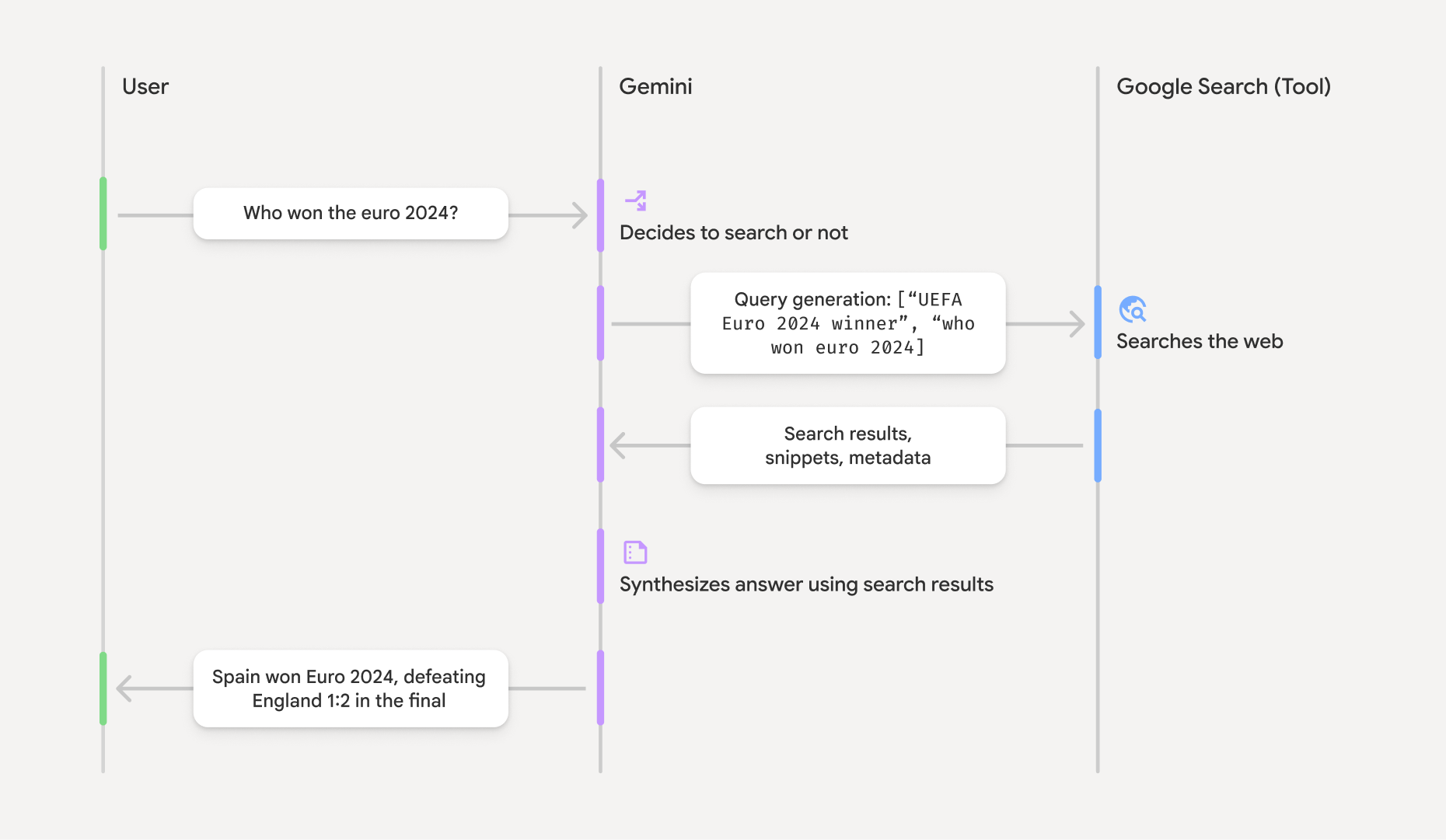
Quando você usa a ferramenta GoogleSearch, o modelo processa todo o fluxo de trabalho de
pesquisa, tratamento e citação de informações automaticamente.
Este é o fluxo de trabalho do modelo:
- Receber comando: seu app envia um comando para o modelo Gemini
com a ferramenta
GoogleSearchativada. - Analisar comando: o modelo analisa o comando e determina se o
Google Search pode melhorar a resposta. - Enviar consultas para
Google Search : se necessário, o modelo gera e executa automaticamente uma ou várias consultas de pesquisa. - Processar os resultados da pesquisa: o modelo processa os resultados de
Google Search e formula uma resposta ao comando original. - Retornar um "resultado embasado": o modelo retorna uma resposta final e fácil de usar que se baseia nos resultados do
Google Search . Essa resposta inclui a resposta de texto do modelo egroundingMetadatacom as consultas de pesquisa, os resultados da Web e as fontes.
Fornecer groundingMetadata e, portanto, não é um "resultado embasado".
Entender o resultado embasado
Se o modelo fundamentar a resposta em resultados de groundingMetadata que contém dados estruturados essenciais para verificar declarações e criar uma experiência de fonte avançada no seu aplicativo.
O objeto groundingMetadata em um "resultado embasado" contém as seguintes informações:
webSearchQueries: uma matriz das consultas de pesquisa enviadas paraGoogle Search . Essas informações são úteis para depurar e entender o processo de raciocínio do modelo.searchEntryPoint: contém o HTML e o CSS para renderizar as "sugestões deGoogle Search " necessárias. Você precisa obedecer aos requisitos de uso de "Fundamentação comGoogle Search " do provedor de API escolhido: Gemini Developer API ou Agent Platform Gemini API (formerly Vertex AI). Consulte a seção Termos de Serviço nos Termos específicos do serviço. Saiba como usar e mostrar um resultado embasado mais adiante nesta página.groundingChunks: uma matriz de objetos que contém as fontes da Web (urietitle).groundingSupports: uma matriz de partes para conectar a resposta do modelotextàs fontes emgroundingChunks. Cada trecho vincula um textosegment(definido porstartIndexeendIndex) a um ou maisgroundingChunkIndices. Esse campo ajuda a criar links de origem inline. Saiba como usar e mostrar um resultado embasado mais adiante nesta página.
Confira um exemplo de resposta que inclui um objeto groundingMetadata:
{
  "candidates": [
    {
      "content": {
        "parts": [
          {
            "text": "Spain won Euro 2024, defeating England 2-1 in the final. This victory marks Spain's record fourth European Championship title."
          }
        ],
        "role": "model"
      },
      "groundingMetadata": {
        "webSearchQueries": [
          "UEFA Euro 2024 winner",
          "who won euro 2024"
        ],
        "searchEntryPoint": {
          "renderedContent": "<!-- HTML and CSS for the search widget -->"
        },
        "groundingChunks": [
          {"web": {"uri": "https://vertexaisearch.cloud.google.com.....", "title": "aljazeera.com"}},
          {"web": {"uri": "https://vertexaisearch.cloud.google.com.....", "title": "uefa.com"}}
        ],
        "groundingSupports": [
          {
            "segment": {"startIndex": 0, "endIndex": 85, "text": "Spain won Euro 2024, defeatin..."},
            "groundingChunkIndices": [0]
          },
          {
            "segment": {"startIndex": 86, "endIndex": 210, "text": "This victory marks Spain's..."},
            "groundingChunkIndices": [0, 1]
          }
        ]
      }
    }
  ]
}
Usar e mostrar um resultado embasado
Se o modelo usar a ferramenta groundingMetadata na resposta.
É obrigatório mostrar sugestões de
Além de obedecer aos requisitos de uso da ferramenta
(Obrigatório) Mostrar sugestões de Google Search
Se uma resposta contiver "sugestões do
O objeto groundingMetadata contém "sugestões de searchEntryPoint, que tem um campo renderedContent que fornece estilo HTML e CSS compatível, que você precisa implementar para mostrar sugestões de pesquisa no seu app.
Consulte as informações detalhadas sobre os
requisitos de exibição e comportamento para sugestões do
Consulte exemplos de código mais adiante nesta seção.
(Obrigatório) Origens de exibição
O objeto groundingMetadata contém dados de origem estruturados, especificamente os campos groundingSupports e groundingChunks. Use essas informações para vincular as declarações do modelo diretamente às fontes na sua interface (inline e agregadas).
Consulte exemplos de código mais adiante nesta seção.
Exemplos de código
Essas amostras de código fornecem padrões generalizados para usar e mostrar o resultado embasado. No entanto, é sua responsabilidade garantir que sua implementação específica esteja alinhada aos requisitos de compliance.
Swift
// ...

// Get the model's response
let text = response.text

// Get the grounding metadata
if let candidate = response.candidates.first,
   let groundingMetadata = candidate.groundingMetadata {
  // REQUIRED - display Google Search suggestions
  // (renderedContent contains HTML and CSS for the search widget)
  if let renderedContent = groundingMetadata.searchEntryPoint?.renderedContent {
    // TODO(developer): Display Google Search suggestions using a WebView
  }

  // REQUIRED - display sources
  let groundingChunks = groundingMetadata.groundingChunks
  for chunk in groundingMetadata.groundingChunks {
    if let web = chunk.web {
      let title = web.title  // for example, "uefa.com"
      let uri = web.uri  // for example, "https://vertexaisearch.cloud.google.com..."
      // TODO(developer): show source in the UI
    }
  }
}
Kotlin
// ...

// Get the model's response
val text = response.text

// Get the grounding metadata
val groundingMetadata = response.candidates.firstOrNull()?.groundingMetadata

// REQUIRED - display Google Search suggestions
// (renderedContent contains HTML and CSS for the search widget)
val renderedContent = groundingMetadata?.searchEntryPoint?.renderedContent
if (renderedContent != null) {
    // TODO(developer): Display Google Search suggestions using a WebView
}

// REQUIRED - display sources
val groundingChunks = groundingMetadata?.groundingChunks
groundingChunks?.let { chunks ->
  for (chunk in chunks) {
  	val title = chunk.web?.title  // for example, "uefa.com"
	val uri = chunk.web?.uri  // for example, "https://vertexaisearch.cloud.google.com..."
// TODO(developer): show source in the UI
  }
}
Java
// ...

Futures.addCallback(response, new FutureCallback() {
  @Override
  public void onSuccess(GenerateContentResponse result) {
  // Get the model's response
  String text = result.getText();

  // Get the grounding metadata
  GroundingMetadata groundingMetadata =
  result.getCandidates()[0].getGroundingMetadata();

  if (groundingMetadata != null) {
    // REQUIRED - display Google Search suggestions
  // (renderedContent contains HTML and CSS for the search widget)
    String renderedContent =
  groundingMetadata.getSearchEntryPoint().getRenderedContent();
    if (renderedContent != null) {
      // TODO(developer): Display Google Search suggestions using a WebView
    }

    // REQUIRED - display sources
    List chunks = groundingMetadata.getGroundingChunks();
    if (chunks != null) {
      for(GroundingChunk chunk : chunks) {
        WebGroundingChunk web = chunk.getWeb();
        if (web != null) {
          String title = web.getTitle();  // for example, "uefa.com"
          String uri = web.getUri();  // for example, "https://vertexaisearch.cloud.google.com..."
          // TODO(developer): show sources in the UI
        }
      }
    }
  }
  }

  @Override
  public void onFailure(Throwable t) {
  t.printStackTrace();
  }
  }, executor);
Web
// ...

// Get the model's text response
const text = result.response.text();

// Get the grounding metadata
const groundingMetadata = result.response.candidates?.[0]?.groundingMetadata;

// REQUIRED - display Google Search suggestions
// (renderedContent contains HTML and CSS for the search widget)
const renderedContent = groundingMetadata?.searchEntryPoint?.renderedContent;
if (renderedContent) {
  // TODO(developer): render this HTML and CSS in the UI
}

// REQUIRED - display sources
const groundingChunks = groundingMetadata?.groundingChunks;
if (groundingChunks) {
  for (const chunk of groundingChunks) {
    const title = chunk.web?.title;  // for example, "uefa.com"
    const uri = chunk.web?.uri;  // for example, "https://vertexaisearch.cloud.google.com..."
    // TODO(developer): show sources in the UI
  }
}
Dart
// ...

// Get the model's response
final text = response.text;

// Get the grounding metadata
final groundingMetadata = response.candidates.first.groundingMetadata;

// REQUIRED - display Google Search suggestions
// (renderedContent contains HTML and CSS for the search widget)
final renderedContent = groundingMetadata?.searchEntryPoint?.renderedContent;
if (renderedContent != null) {
    // TODO(developer): Display Google Search suggestions using a WebView
}

// REQUIRED - display sources
final groundingChunks = groundingMetadata?.groundingChunks;
if (groundingChunks != null) {
  for (var chunk in groundingChunks) {
    final title = chunk.web?.title;  // for example, "uefa.com"
    final uri = chunk.web?.uri;  // for example, "https://vertexaisearch.cloud.google.com..."
    // TODO(developer): show sources in the UI
  }
}
Unity
// ...

// Get the model's response.
var text = response.Text;

// Get the grounding metadata.
var groundingMetadata = response.Candidates.First().GroundingMetadata.Value;

// REQUIRED - display Google Search suggestions
// (renderedContent contains HTML and CSS for the search widget)
if (groundingMetadata.SearchEntryPoint.HasValue) {
    var renderedContent = groundingMetadata.SearchEntryPoint.Value.RenderedContent;
    // TODO(developer): Display Google Search suggestions using a WebView
}

// REQUIRED - display sources
foreach(GroundingChunk chunk in groundingMetadata.GroundingChunks) {
    var title = chunk.Web.Value.Title;  // for example, "uefa.com"
    var uri = chunk.Web.Value.Uri;  // for example, "https://vertexaisearch.cloud.google.com..."
    // TODO(developer): show sources in the UI
}
Resultados embasados e monitoramento de IA no console do Firebase
Se você ativou o monitoramento de IA no console do Firebase, as respostas são armazenadas em Cloud Logging. Por padrão, esses dados têm um período de armazenamento de 30 dias.
É sua responsabilidade garantir que esse período de armazenamento ou qualquer período personalizado definido por você esteja totalmente alinhado ao seu caso de uso específico e a outros requisitos de compliance do provedor de Gemini API escolhido: Gemini Developer API ou Agent Platform Gemini API (formerly Vertex AI) (consulte a seção Termos de Serviço nos Termos Específicos do Serviço). Talvez seja necessário ajustar o período de armazenamento em Cloud Logging para atender a esses requisitos.
Preços e limites
Confira os preços, a disponibilidade de modelos e os limites da fundamentação com