

借助 FCM AndroidConfigV2,您可以使用简化的 API 向 Android 设备发送意图驱动的消息,并及时送达通知。
本指南介绍了如何将后端发送请求从 AndroidConfig 迁移到 AndroidConfigV2,以及如何将 Android 应用客户端从旧版 onMessageReceived 处理更新为新的 v2 客户端回调 onNotificationReceived 和 onBackgroundSyncReceived。
AndroidConfigV2 的新变化
FCM AndroidConfigV2 API 引入了两种消息类型,从而简化了开发者体验:
RemoteNotification:建议用于 显示紧急、有时效性且用户可见的通知的所有 FCM 消息。这些消息会绕过所有省电措施,并会立即传送。在设备上,FCM SDK 和 Google Play 服务负责将通知发布到 Android 的NotificationManager。BackgroundSync:用于后台同步和应用状态更新的非紧急数据消息。为了优化电池续航时间,系统可能会批量传送或延迟传送。
| 功能 | 旧版 (AndroidConfig v1) |
新(AndroidConfigV2) |
|---|---|---|
| 配置字段 | message.android |
message.android_v2 |
| 优先级定义 | 显式 priority: "high" 或 priority: "normal" |
由联合类型暗示(remote_notification 表示紧急提醒,background_sync 表示非紧急同步) |
| 通知发布 | 应用手动调用 NotificationManager.notify() |
FCM SDK 和 GMS Core 直接或使用 NotificationResponse 发布 |
| 客户端回调 | • onMessageReceived(RemoteMessage)• onDeletedMessages() |
• onNotificationReceived(RemoteMessage)• onBackgroundSyncReceived(RemoteMessage)• onDeletedMessages() |
| 可折叠性 | 各不相同;需要明确设置 | 这两种类型的消息都可以是可折叠或不可折叠消息(默认情况下为不可折叠消息) |
为 AndroidConfigV2 发送请求提供授权
您可以继续使用通过 Google 应用默认凭证或 Admin SDK 从 Firebase 服务账号派生的 OAuth 2.0 访问令牌,并向 HTTP v1 messages:send 端点发送 POST 请求。
如果您不使用 Firebase 服务账号,请务必为您的专用账号分配 Firebase Cloud Messaging API Admin 角色 (roles/firebase.messagingAdmin),并在生成访问令牌时请求 https://www.googleapis.com/auth/firebase.messaging OAuth 2.0 范围:
POST https://fcm.googleapis.com/v1/projects/YOUR_PROJECT_ID/messages:send HTTP/1.1
Authorization: Bearer YOUR_OAUTH_ACCESS_TOKEN
Content-Type: application/json
更新服务器发送请求 (REST)
如需使用 REST API 发送 AndroidConfigV2 请求,请将请求正文中的 android 对象替换为 android_v2。在 android_v2 中,指定通用参数(例如 ttl、collapse_key、data 和 restricted_package_name),并提供以下联合字段之一:remote_notification 或 background_sync。
发送 RemoteNotification 消息
如需发送面向用户的紧急通知,请添加 remote_notification 对象及其推荐的 notification 载荷。默认情况下,mutable_content 设置为 false。GMS Core 会立即呈现通知并将其发布到系统任务栏,而无需执行后台应用代码。
完整的 HTTP 请求 JSON 示例(自动呈现的通知)
POST https://fcm.googleapis.com/v1/projects/myproject-b5ae1/messages:send HTTP/1.1
Content-Type: application/json
Authorization: Bearer ya29.ElqKBGN2Ri_Uz...HnS_uNreA

{
  "message": {
    "token": "bk3RNwTe3H0:CI2k_HHwgIpoDKCIZvvDMExUdFQ3P1...",
    "notification": {
      "title": "FCM Message",
      "body": "This is an FCM notification message!"
    },
    "android_v2": {
      "ttl": "3600s",
      "remote_notification": {
        "mutable_content": false,
        "notification": {
          "title": "Order update",
          "body": "Your order has been shipped!",
          "icon": "ic_notification_custom",
          "sound": "default",
          "tag": "alert_tag_1",
          "id": 100
        }
      }
    }
  }
}
发送包含可变内容的 RemoteNotification
如果您的应用需要在设备上显示通知之前对其进行修改,请在 remote_notification 中设置 mutable_content: true。这会指示 GMS Core 绑定到您的客户端应用并调用 onNotificationReceived()。如果您想解密端到端加密载荷、附加用户头像或本地化字符串,此功能会非常有用。
即使 mutable_content 为 true,也请务必在 remote_notification 中添加 notification 对象。如果客户端回调超时或超出抑制限制,GMS Core 会使用此 notification 对象作为后备通知。
如果您要从旧版 v1 数据消息进行迁移,并且希望 FCM 将载荷作为纯数据消息传递到旧版 v1 客户端安装,请在 remote_notification 中设置 use_as_v1_data_message: true。
完整的 HTTP 请求 JSON 示例
POST https://fcm.googleapis.com/v1/projects/myproject-b5ae1/messages:send HTTP/1.1
Content-Type: application/json
Authorization: Bearer ya29.ElqKBGN2Ri_Uz...HnS_uNreA

{
  "message": {
    "token": "bk3RNwTe3H0:CI2k_HHwgIpoDKCIZvvDMExUdFQ3P1...",
    "data": {
      "encrypted_content": "U2FsdGVkX19vN2m+",
      "sender_id": "user_98124"
    },
    "android_v2": {
      "ttl": "3600s",
      "remote_notification": {
        "mutable_content": true,
        "use_as_v1_data_message": true,
        "notification": {
          "title": "New message",
          "body": "You have a new message",
          "tag": "chat_alert",
          "id": 1001
        }
      }
    }
  }
}
发送 BackgroundSync 消息
如需发送非紧急消息以进行后台数据同步、静默状态更新或更新应用标志或 widget,请使用 background_sync 对象。
请勿使用这些消息发布用户可见的通知,因为这些消息可能会被批量处理或延迟发送,以优化设备电池续航时间。
完整的 HTTP 请求 JSON 示例
POST https://fcm.googleapis.com/v1/projects/myproject-b5ae1/messages:send HTTP/1.1
Content-Type: application/json
Authorization: Bearer ya29.ElqKBGN2Ri_Uz...HnS_uNreA

{
  "message": {
    "token": "bk3RNwTe3H0:CI2k_HHwgIpoDKCIZvvDMExUdFQ3P1...",
    "data": {
      "score": "FETCH_UPDATES",
      "sync_action": "FETCH_UPDATES"
    },
    "android_v2": {
      "ttl": "86400s",
      "collapse_key": "app_state_sync",
      "background_sync": {}
    }
  }
}
更新 Android 客户端回调
如需在 Android 上接收 AndroidConfigV2 消息,请升级您的应用以使用最新的 firebase-messaging SDK。通过实现 onNotificationReceived() 和 onBackgroundSyncReceived() 来更新扩展 FirebaseMessagingService 的服务。
安装 EAP SDK
在 EAP 期间,firebase-messaging v2 SDK 将作为本地 Maven 仓库归档进行分发,而不是通过 Google 的公共 Maven 仓库进行分发。
使用以下任一选项将包含
firebase-messaging:26.1.0-eap01的m2repository目录添加到 Android 项目 (<project-root>/m2repository) 的根目录:- 方法 A:下载预构建归档:下载 FirebaseMessaging_26.1.0-eap01.zip,并将
m2repository目录解压缩到 Android 项目 (<project-root>/m2repository) 的根目录中。 选项 B:使用 Gradle 从 GitHub 构建:克隆
firebase/firebase-android-sdk的feature/fcm-android-config-v2-eap分支,构建本地 Maven 仓库,然后将生成的build/m2repository目录复制到 Android 项目根目录中:git clone --branch feature/fcm-android-config-v2-eap --single-branch \ https://github.com/firebase/firebase-android-sdk.git cd firebase-android-sdk ./gradlew -PprojectsToPublish="firebase-messaging" firebasePublish cp -R build/m2repository /path/to/your/android-project/m2repository
- 方法 A:下载预构建归档:下载 FirebaseMessaging_26.1.0-eap01.zip,并将
在项目级
settings.gradle.kts(或settings.gradle)中,将本地m2repository目录添加到repositories代码块的顶部,即google()的上方:Kotlin
dependencyResolutionManagement {
    repositoriesMode.set(RepositoriesMode.FAIL_ON_PROJECT_REPOS)
    repositories {
        maven { url = uri("${rootDir}/m2repository") }
        google()
        mavenCentral()
    }
}
Groovy
dependencyResolutionManagement {
    repositoriesMode.set(RepositoriesMode.FAIL_ON_PROJECT_REPOS)
    repositories {
        maven { url "${rootDir}/m2repository" }
        google()
        mavenCentral()
    }
}
在模块级
app/build.gradle.kts(或app/build.gradle)中,将firebase-messaging依赖项更新为26.1.0-eap01:Kotlin
dependencies {
    implementation("com.google.firebase:firebase-messaging:26.1.0-eap01")
}
Groovy
dependencies { implementation 'com.google.firebase:firebase-messaging:26.1.0-eap01' }将项目与 Gradle 文件同步。
使用 onNotificationReceived 处理 RemoteNotifications
使用 AndroidConfigV2 时,系统会显示 RemoteNotification 消息,除非 mutable_content 设置为 true 或在 onNotificationReceived() 中明确将其静音。
当 RemoteNotification 携 mutable_content: true 到达时,GMS Core 会绑定到您的应用并调用 onNotificationReceived()。您的方法必须在 20 秒内返回 NotificationResponse。
返回修改后的通知
您传递给 NotificationResponse.create 的 Notification 对象会替换在发送请求中定义的服务器 remote_notification.notification 后备载荷属性。如需保留发送请求中的值,请在应用设备端修改时从 message.notification(Java 中为 message.getNotification())中读取这些值:
Kotlin
import androidx.core.app.NotificationCompat
import com.google.firebase.messaging.FirebaseMessagingService
import com.google.firebase.messaging.NotificationResponse
import com.google.firebase.messaging.RemoteMessage

class MyFirebaseMessagingService : FirebaseMessagingService() {

    override fun onNotificationReceived(message: RemoteMessage): NotificationResponse {
        val serverNotif = message.notification
        val channelId = serverNotif?.channelId ?: "default_channel"
        // Keep the server-defined title unchanged, or fall back to default
        val title = serverNotif?.title ?: "New message"
        // Modify the notification body on-device (for example, decrypting data)
        val decryptedBody = decryptPayload(message.data["encrypted_content"])

        val builder = NotificationCompat.Builder(this, channelId)
            .setSmallIcon(R.drawable.ic_stat_notification)
            .setContentTitle(title)
            .setContentText(decryptedBody)
            .setPriority(NotificationCompat.PRIORITY_HIGH)
            .setAutoCancel(true)

        // Return the response for the open-source FCM SDK to post to the Android platform
        return NotificationResponse.create("optional_tag", 100, builder.build())
    }
}
Java
import com.google.firebase.messaging.FirebaseMessagingService;
import com.google.firebase.messaging.RemoteMessage;
import com.google.firebase.messaging.NotificationResponse;
import androidx.core.app.NotificationCompat;

public class MyFirebaseMessagingService extends FirebaseMessagingService {

    @Override
    public NotificationResponse onNotificationReceived(RemoteMessage message) {
        RemoteMessage.Notification serverNotif = message.getNotification();
        String channelId = (serverNotif != null && serverNotif.getChannelId() != null)
                ? serverNotif.getChannelId()
                : "default_channel";
        // Keep the server-defined title unchanged, or fall back to default
        String title = (serverNotif != null && serverNotif.getTitle() != null)
                ? serverNotif.getTitle()
                : "New message";
        // Modify the notification body on-device (for example, decrypting data)
        String decryptedBody = decryptPayload(message.getData().get("encrypted_content"));

        NotificationCompat.Builder builder = new NotificationCompat.Builder(this, channelId)
                .setSmallIcon(R.drawable.ic_stat_notification)
                .setContentTitle(title)
                .setContentText(decryptedBody)
                .setPriority(NotificationCompat.PRIORITY_HIGH)
                .setAutoCancel(true);

        // Return the response for the open-source FCM SDK to post to the Android platform
        return NotificationResponse.create("optional_tag", 100, builder.build());
    }
}
关闭通知
如果用户当前正在使用相关屏幕或聊天,您可以通过返回 NotificationResponse.suppress() 来抑制通知:
Kotlin
import androidx.lifecycle.Lifecycle
import androidx.lifecycle.ProcessLifecycleOwner

override fun onNotificationReceived(message: RemoteMessage): NotificationResponse {
    val chatId = message.data["chat_id"]
    val isAppForeground = ProcessLifecycleOwner.get()
        .lifecycle
        .currentState
        .isAtLeast(Lifecycle.State.STARTED)

    if (isAppForeground && chatRepository.isConversationActive(chatId)) {
        // Suppress notification display because the user is actively viewing this chat
        return NotificationResponse.suppress()
    }

    val builder = buildNotificationForChat(message)
    return NotificationResponse.create("chat_tag", 101, builder.build())
}
Java
import androidx.lifecycle.Lifecycle;
import androidx.lifecycle.ProcessLifecycleOwner;

@Override
public NotificationResponse onNotificationReceived(RemoteMessage message) {
    String chatId = message.getData().get("chat_id");
    boolean isAppForeground = ProcessLifecycleOwner.get()
            .getLifecycle()
            .getCurrentState()
            .isAtLeast(Lifecycle.State.STARTED);

    if (isAppForeground && chatRepository.isConversationActive(chatId)) {
        // Suppress notification display because the user is actively viewing this chat
        return NotificationResponse.suppress();
    }

    NotificationCompat.Builder builder = buildNotificationForChat(message);
    return NotificationResponse.create("chat_tag", 101, builder.build());
}
流式传输通知或取消旧提醒 (FcmNotificationManager)
如果您需要针对单个传入推送发布多条通知,或在显示新通知之前取消过时通知,请使用 FcmNotificationManager:
Kotlin
override fun onNotificationReceived(message: RemoteMessage): NotificationResponse {
    // Retrieve the scoped manager for this message execution
    val manager = getFcmNotificationManager(message)

    // 1. Cancel an outdated notification right away
    manager.cancelNow("message_tag", 50)

    // 2. Post the item notification immediately
    val itemNotif = NotificationCompat.Builder(this, "chat_channel")
        .setSmallIcon(R.drawable.ic_message)
        .setContentTitle("Alex")
        .setContentText(message.data["text"])
    manager.postNow("item_tag", 51, itemNotif.build())

    // 3. Post a group summary notification
    val summaryNotif = NotificationCompat.Builder(this, "chat_channel")
        .setSmallIcon(R.drawable.ic_message)
        .setContentTitle("New Conversations")
        .setGroupSummary(true)
    manager.postNow("summary_tag", 52, summaryNotif.build())

    // 4. Return finished() to complete the streaming workflow
    return manager.finished()
}
Java
@Override
public NotificationResponse onNotificationReceived(RemoteMessage message) {
    // Retrieve the scoped manager for this message execution
    FcmNotificationManager manager = getFcmNotificationManager(message);

    // 1. Cancel an outdated notification right away
    manager.cancelNow("message_tag", 50);

    // 2. Post the item notification immediately
    NotificationCompat.Builder itemNotif = new NotificationCompat.Builder(this, "chat_channel")
            .setSmallIcon(R.drawable.ic_message)
            .setContentTitle("Alex")
            .setContentText(message.getData().get("text"));
    manager.postNow("item_tag", 51, itemNotif.build());

    // 3. Post a group summary notification
    NotificationCompat.Builder summaryNotif = new NotificationCompat.Builder(this, "chat_channel")
            .setSmallIcon(R.drawable.ic_message)
            .setContentTitle("New Conversations")
            .setGroupSummary(true);
    manager.postNow("summary_tag", 52, summaryNotif.build());

    // 4. Return finished() to complete the streaming workflow
    return manager.finished();
}
使用 onBackgroundSyncReceived 处理 BackgroundSync 消息
如需在 Android 上处理 BackgroundSync 消息,请使用 onBackgroundSyncReceived():
Kotlin
override fun onBackgroundSyncReceived(message: RemoteMessage) {
    val syncCommand = message.data["sync_action"]

    try {
        // Perform local database synchronization or cache refresh
        AppDataRepository.getInstance(applicationContext).syncWithServer(syncCommand)
    } catch (e: Exception) {
        Log.e("FCM", "Background sync operation failed", e)
    }
    // Execution completes -> GMS Core marks the message as handled and unbinds.
}
Java
@Override
public void onBackgroundSyncReceived(RemoteMessage message) {
    String syncCommand = message.getData().get("sync_action");

    try {
        // Perform local database synchronization or cache refresh
        AppDataRepository.getInstance(getApplicationContext()).syncWithServer(syncCommand);
    } catch (Exception e) {
        Log.e("FCM", "Background sync operation failed", e);
    }
    // Execution completes -> GMS Core marks the message as handled and unbinds.
}
使用 onDeletedMessages 处理待删除的消息
在某些情况下,例如当设备长时间未连接到 FCM 或服务器队列已满时,FCM 可能会在传递之前删除待处理的消息。在这些情况下,请替换 onDeletedMessages():
Kotlin
override fun onDeletedMessages() {
    // Perform a full state synchronization with your app server
    AppDataRepository.getInstance(applicationContext).scheduleFullSync()
}
Java
@Override
public void onDeletedMessages() {
    // Perform a full state synchronization with your app server
    AppDataRepository.getInstance(getApplicationContext()).scheduleFullSync();
}
迁移特定应用
发送端到端加密 (E2EE) 通知
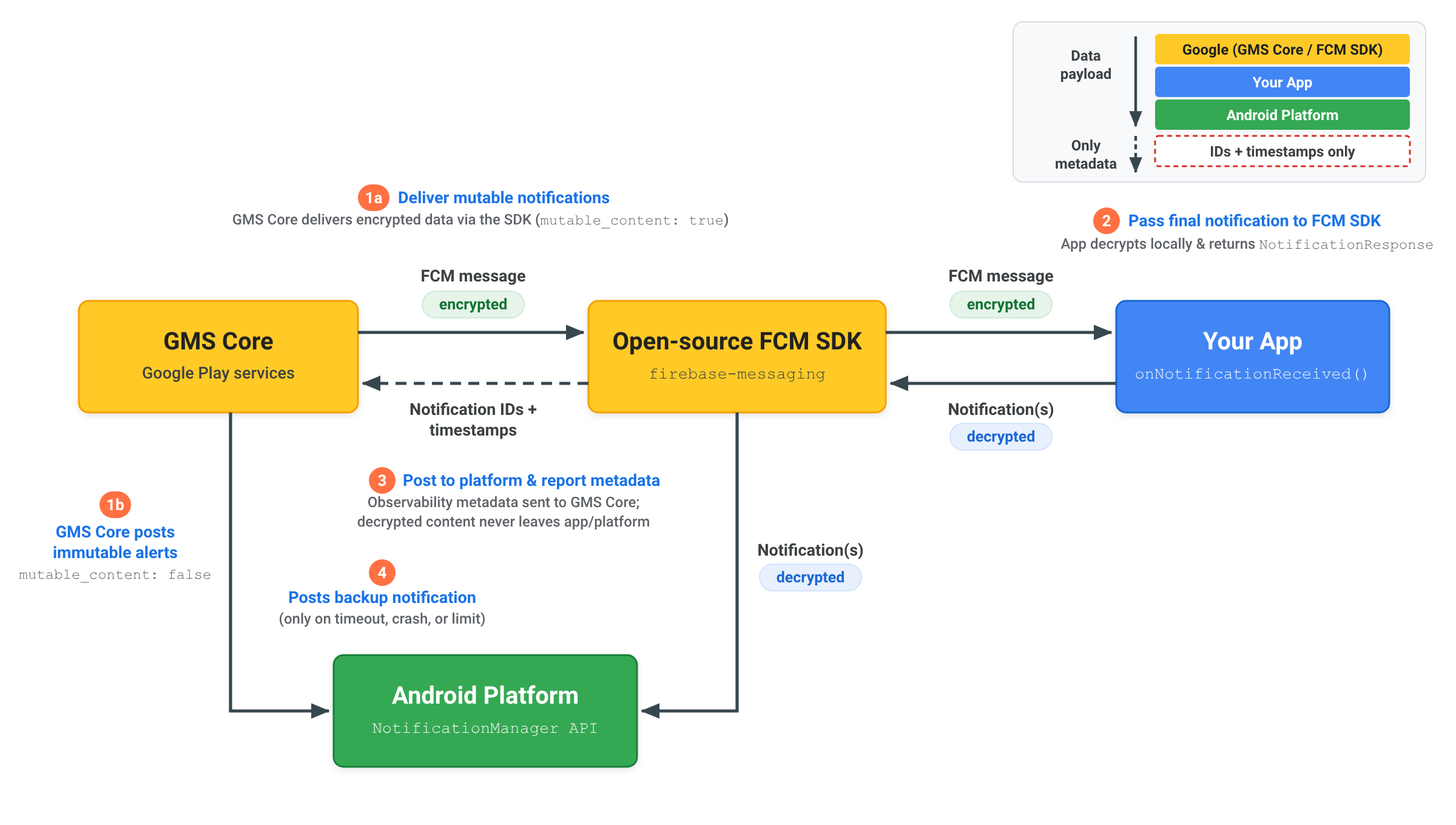
使用 RemoteNotification 传送端到端加密通知时,解密的通知内容会保留在您的应用和 Android 平台中:
- 发送可变通知:您的服务器发送一个包含
mutable_content: true、data中的加密载荷以及通用未加密备份notification的RemoteNotification。GMS Core 会将加密消息传递给应用内的开源 FCM SDK。 - 解密并返回通知:FCM SDK 调用
onNotificationReceived()。您的应用在本地解密载荷,构建最终解密的 AndroidNotification,并使用NotificationResponse或FcmNotificationManager将其传回开源 FCM SDK。 - 向平台发布通知并报告元数据:开源 FCM SDK 会将解密后的通知直接发布到 Android 平台
NotificationManagerAPI,并且仅将通知元数据(例如通知 ID 和时间戳)发送回 GMS Core,以便观察通知传送情况。解密后的内容绝不会发送到 GMS Core。 - 在必要时发布备份通知:只有在您的应用未能在 20 秒超时时间内做出响应或超出后台抑制限制时,GMS Core 才会直接向 Android 平台发布通用备份
notification。
了解通知抑制和超时
为了在整个 Android 生态系统中保持可靠的递送,GMS Core 在处理 RemoteNotification 消息时会应用处理超时和通知抑制限制:
处理超时
如果 mutable_content 设置为 true,则 onNotificationReceived() 方法必须在 20 秒内返回 NotificationResponse。如果执行时间超过此阈值,系统会取消回调,并且 GMS Core 会自动发布根据 remote_notification.notification 载荷呈现的后备通知。
通知抑制率
由于 RemoteNotification 消息会绕过低电耗模式限制,以便立即提醒用户并及时送达,因此应用应针对收到的 RemoteNotification 消息显示通知。
每个应用在后台运行时最多可抑制 25% 的 RemoteNotification 流量。如果应用的抑制率超过 25%,GMS Core 会自动呈现并发布根据 remote_notification.notification 载荷呈现的后备通知。
应用在前台处于活跃状态时执行的抑制操作不计入此阈值。获得无限制后台使用权限的应用也不受后台抑制限制。