
Using the FCM AndroidConfigV2, you can send intent
driven messages to Android devices with timely notification delivery and a
simplified API.
This guide covers how to migrate your backend send requests from AndroidConfig
to AndroidConfigV2 and how to update your Android application
clients from legacy onMessageReceived handling to the new v2 client
callbacks onNotificationReceived and onBackgroundSyncReceived.
What's new in AndroidConfigV2
The FCM AndroidConfigV2 API simplifies developer experience by introducing two message types:
RemoteNotification: Recommended for all FCM messages that display an urgent, time-sensitive user-visible notification. These messages bypass any battery-saving measures and are delivered without delay. On the device, the FCM SDK and Google Play services take ownership of posting the notification to Android'sNotificationManager.BackgroundSync: Non-urgent data messages intended for background synchronization and app state updates. Delivery can be batched or delayed to optimize battery life.
| Feature | Legacy (AndroidConfig v1) |
New (AndroidConfigV2) |
|---|---|---|
| Configuration field | message.android |
message.android_v2 |
| Priority definition | Explicit priority: "high" or priority: "normal" |
Implied by union type (remote_notification for urgent alerts versus background_sync for non-urgent sync) |
| Notification posting | App manually calls NotificationManager.notify() |
FCM SDK and GMS Core posts directly or using NotificationResponse |
| Client callbacks | • onMessageReceived(RemoteMessage)• onDeletedMessages() |
• onNotificationReceived(RemoteMessage)• onBackgroundSyncReceived(RemoteMessage)• onDeletedMessages() |
| Collapsibility | Varied; required explicit setting | Both message types can be collapsible or non-collapsible (not collapsible by default) |
Authorize AndroidConfigV2 send requests
You can continue to use OAuth 2.0 access tokens derived from your Firebase
service account using Google Application Default Credentials or the Admin SDK,
and send POST requests to the HTTP v1 messages:send endpoint.
If you're not using your Firebase service account, make sure to assign your dedicated account to the Firebase Cloud Messaging API Admin role (roles/firebase.messagingAdmin)
and request the https://www.googleapis.com/auth/firebase.messaging OAuth 2.0
scope when minting access tokens:
POST https://fcm.googleapis.com/v1/projects/YOUR_PROJECT_ID/messages:send HTTP/1.1
Authorization: Bearer YOUR_OAUTH_ACCESS_TOKEN
Content-Type: application/json
Update server send requests (REST)
To send an AndroidConfigV2 request using the REST API, replace the android
object in your request body with android_v2. Within android_v2, specify
common parameters (such as ttl, collapse_key, data, and
restricted_package_name), and provide one of the following union fields:
remote_notification or background_sync.
Send a RemoteNotification message
To send an urgent, user-facing notification, include the remote_notification
object and its recommended notification payload. By default mutable_content
is set to false. The GMS Core immediately renders and posts the notification to
the system tray without executing background app code.
Complete HTTP request JSON sample (Auto-rendered notification)
POST https://fcm.googleapis.com/v1/projects/myproject-b5ae1/messages:send HTTP/1.1
Content-Type: application/json
Authorization: Bearer ya29.ElqKBGN2Ri_Uz...HnS_uNreA

{
  "message": {
    "token": "bk3RNwTe3H0:CI2k_HHwgIpoDKCIZvvDMExUdFQ3P1...",
    "notification": {
      "title": "FCM Message",
      "body": "This is an FCM notification message!"
    },
    "android_v2": {
      "ttl": "3600s",
      "remote_notification": {
        "mutable_content": false,
        "notification": {
          "title": "Order update",
          "body": "Your order has been shipped!",
          "icon": "ic_notification_custom",
          "sound": "default",
          "tag": "alert_tag_1",
          "id": 100
        }
      }
    }
  }
}
Send a RemoteNotification with mutable content
If your application needs to modify the notification on the device before it is
displayed, set mutable_content: true inside remote_notification. This
instructs GMS Core to bind to your client application and invoke
onNotificationReceived(). This is helpful when you want to decrypt an
end-to-end encrypted payload, attach user avatars, or
localize strings.
Make sure to include a notification object inside remote_notification even
when mutable_content is true. GMS Core uses this notification object as
the fallback notification if the client callback times out or exceeds
suppression limits.
If you're migrating from legacy v1 data messages and want FCM to
deliver the payload to older v1 client installations as a pure data message, set
use_as_v1_data_message: true inside remote_notification.
Complete HTTP request JSON sample
POST https://fcm.googleapis.com/v1/projects/myproject-b5ae1/messages:send HTTP/1.1
Content-Type: application/json
Authorization: Bearer ya29.ElqKBGN2Ri_Uz...HnS_uNreA

{
  "message": {
    "token": "bk3RNwTe3H0:CI2k_HHwgIpoDKCIZvvDMExUdFQ3P1...",
    "data": {
      "encrypted_content": "U2FsdGVkX19vN2m+",
      "sender_id": "user_98124"
    },
    "android_v2": {
      "ttl": "3600s",
      "remote_notification": {
        "mutable_content": true,
        "use_as_v1_data_message": true,
        "notification": {
          "title": "New message",
          "body": "You have a new message",
          "tag": "chat_alert",
          "id": 1001
        }
      }
    }
  }
}
Send a BackgroundSync message
To send a non-urgent message for background data synchronization, silent state
updates, or updating an app badge or widget, use the background_sync object.
Don't use these messages to post
user-visible notifications, as these can be batched or delayed to optimize
device battery life.
Complete HTTP request JSON sample
POST https://fcm.googleapis.com/v1/projects/myproject-b5ae1/messages:send HTTP/1.1
Content-Type: application/json
Authorization: Bearer ya29.ElqKBGN2Ri_Uz...HnS_uNreA

{
  "message": {
    "token": "bk3RNwTe3H0:CI2k_HHwgIpoDKCIZvvDMExUdFQ3P1...",
    "data": {
      "score": "FETCH_UPDATES",
      "sync_action": "FETCH_UPDATES"
    },
    "android_v2": {
      "ttl": "86400s",
      "collapse_key": "app_state_sync",
      "background_sync": {}
    }
  }
}
Update Android client callbacks
To receive AndroidConfigV2 messages on Android, upgrade your app to use the
latest firebase-messaging SDK. Update your service extending
FirebaseMessagingService by implementing onNotificationReceived() and
onBackgroundSyncReceived().
Install the EAP SDK
During the EAP, the firebase-messaging v2 SDK is distributed as a local Maven
repository archive rather than through Google's public Maven repository.
Add the
m2repositorydirectory containingfirebase-messaging:26.1.0-eap01to the root directory of your Android project (<project-root>/m2repository) using one of the following options:- Option A: Download the prebuilt archive: Download
FirebaseMessaging_26.1.0-eap01.zip
and extract the
m2repositorydirectory into the root directory of your Android project (<project-root>/m2repository). Option B: Build from GitHub with Gradle: Clone the
feature/fcm-android-config-v2-eapbranch offirebase/firebase-android-sdk, build the local Maven repository, and copy the generatedbuild/m2repositorydirectory into your Android project root:git clone --branch feature/fcm-android-config-v2-eap --single-branch \ https://github.com/firebase/firebase-android-sdk.git cd firebase-android-sdk ./gradlew -PprojectsToPublish="firebase-messaging" firebasePublish cp -R build/m2repository /path/to/your/android-project/m2repository
- Option A: Download the prebuilt archive: Download
FirebaseMessaging_26.1.0-eap01.zip
and extract the
In your project-level
settings.gradle.kts(orsettings.gradle), add the localm2repositorydirectory to the top of yourrepositoriesblock, abovegoogle():Kotlin
dependencyResolutionManagement {
    repositoriesMode.set(RepositoriesMode.FAIL_ON_PROJECT_REPOS)
    repositories {
        maven { url = uri("${rootDir}/m2repository") }
        google()
        mavenCentral()
    }
}
Groovy
dependencyResolutionManagement {
    repositoriesMode.set(RepositoriesMode.FAIL_ON_PROJECT_REPOS)
    repositories {
        maven { url "${rootDir}/m2repository" }
        google()
        mavenCentral()
    }
}
In your module-level
app/build.gradle.kts(orapp/build.gradle), update yourfirebase-messagingdependency to26.1.0-eap01:Kotlin
dependencies {
    implementation("com.google.firebase:firebase-messaging:26.1.0-eap01")
}
Groovy
dependencies { implementation 'com.google.firebase:firebase-messaging:26.1.0-eap01' }Sync your project with Gradle files.
Handle RemoteNotifications with onNotificationReceived
With AndroidConfigV2, RemoteNotification messages are displayed
unless mutable_content is set to true or they're explicitly silenced in
onNotificationReceived().
When a RemoteNotification arrives with mutable_content: true, GMS Core binds
to your application and calls onNotificationReceived(). Your method must
return a NotificationResponse within 20 seconds.
Return a modified notification
The Notification object you pass to NotificationResponse.create replaces the
server's remote_notification.notification fallback payload properties defined
in the send request. To keep values from the send request, read them from
message.notification (message.getNotification() in Java) while applying
on-device modifications:
Kotlin
import androidx.core.app.NotificationCompat
import com.google.firebase.messaging.FirebaseMessagingService
import com.google.firebase.messaging.NotificationResponse
import com.google.firebase.messaging.RemoteMessage

class MyFirebaseMessagingService : FirebaseMessagingService() {

    override fun onNotificationReceived(message: RemoteMessage): NotificationResponse {
        val serverNotif = message.notification
        val channelId = serverNotif?.channelId ?: "default_channel"
        // Keep the server-defined title unchanged, or fall back to default
        val title = serverNotif?.title ?: "New message"
        // Modify the notification body on-device (for example, decrypting data)
        val decryptedBody = decryptPayload(message.data["encrypted_content"])

        val builder = NotificationCompat.Builder(this, channelId)
            .setSmallIcon(R.drawable.ic_stat_notification)
            .setContentTitle(title)
            .setContentText(decryptedBody)
            .setPriority(NotificationCompat.PRIORITY_HIGH)
            .setAutoCancel(true)

        // Return the response for the open-source FCM SDK to post to the Android platform
        return NotificationResponse.create("optional_tag", 100, builder.build())
    }
}
Java
import com.google.firebase.messaging.FirebaseMessagingService;
import com.google.firebase.messaging.RemoteMessage;
import com.google.firebase.messaging.NotificationResponse;
import androidx.core.app.NotificationCompat;

public class MyFirebaseMessagingService extends FirebaseMessagingService {

    @Override
    public NotificationResponse onNotificationReceived(RemoteMessage message) {
        RemoteMessage.Notification serverNotif = message.getNotification();
        String channelId = (serverNotif != null && serverNotif.getChannelId() != null)
                ? serverNotif.getChannelId()
                : "default_channel";
        // Keep the server-defined title unchanged, or fall back to default
        String title = (serverNotif != null && serverNotif.getTitle() != null)
                ? serverNotif.getTitle()
                : "New message";
        // Modify the notification body on-device (for example, decrypting data)
        String decryptedBody = decryptPayload(message.getData().get("encrypted_content"));

        NotificationCompat.Builder builder = new NotificationCompat.Builder(this, channelId)
                .setSmallIcon(R.drawable.ic_stat_notification)
                .setContentTitle(title)
                .setContentText(decryptedBody)
                .setPriority(NotificationCompat.PRIORITY_HIGH)
                .setAutoCancel(true);

        // Return the response for the open-source FCM SDK to post to the Android platform
        return NotificationResponse.create("optional_tag", 100, builder.build());
    }
}
Suppress a notification
If the user has the relevant screen or chat active right now, you can suppress
the notification by returning NotificationResponse.suppress():
Kotlin
import androidx.lifecycle.Lifecycle
import androidx.lifecycle.ProcessLifecycleOwner

override fun onNotificationReceived(message: RemoteMessage): NotificationResponse {
    val chatId = message.data["chat_id"]
    val isAppForeground = ProcessLifecycleOwner.get()
        .lifecycle
        .currentState
        .isAtLeast(Lifecycle.State.STARTED)

    if (isAppForeground && chatRepository.isConversationActive(chatId)) {
        // Suppress notification display because the user is actively viewing this chat
        return NotificationResponse.suppress()
    }

    val builder = buildNotificationForChat(message)
    return NotificationResponse.create("chat_tag", 101, builder.build())
}
Java
import androidx.lifecycle.Lifecycle;
import androidx.lifecycle.ProcessLifecycleOwner;

@Override
public NotificationResponse onNotificationReceived(RemoteMessage message) {
    String chatId = message.getData().get("chat_id");
    boolean isAppForeground = ProcessLifecycleOwner.get()
            .getLifecycle()
            .getCurrentState()
            .isAtLeast(Lifecycle.State.STARTED);

    if (isAppForeground && chatRepository.isConversationActive(chatId)) {
        // Suppress notification display because the user is actively viewing this chat
        return NotificationResponse.suppress();
    }

    NotificationCompat.Builder builder = buildNotificationForChat(message);
    return NotificationResponse.create("chat_tag", 101, builder.build());
}
Stream notifications or cancel older alerts (FcmNotificationManager)
If you need to post multiple notifications for a single incoming push, or cancel
a stale notification before displaying a new one, use FcmNotificationManager:
Kotlin
override fun onNotificationReceived(message: RemoteMessage): NotificationResponse {
    // Retrieve the scoped manager for this message execution
    val manager = getFcmNotificationManager(message)

    // 1. Cancel an outdated notification right away
    manager.cancelNow("message_tag", 50)

    // 2. Post the item notification immediately
    val itemNotif = NotificationCompat.Builder(this, "chat_channel")
        .setSmallIcon(R.drawable.ic_message)
        .setContentTitle("Alex")
        .setContentText(message.data["text"])
    manager.postNow("item_tag", 51, itemNotif.build())

    // 3. Post a group summary notification
    val summaryNotif = NotificationCompat.Builder(this, "chat_channel")
        .setSmallIcon(R.drawable.ic_message)
        .setContentTitle("New Conversations")
        .setGroupSummary(true)
    manager.postNow("summary_tag", 52, summaryNotif.build())

    // 4. Return finished() to complete the streaming workflow
    return manager.finished()
}
Java
@Override
public NotificationResponse onNotificationReceived(RemoteMessage message) {
    // Retrieve the scoped manager for this message execution
    FcmNotificationManager manager = getFcmNotificationManager(message);

    // 1. Cancel an outdated notification right away
    manager.cancelNow("message_tag", 50);

    // 2. Post the item notification immediately
    NotificationCompat.Builder itemNotif = new NotificationCompat.Builder(this, "chat_channel")
            .setSmallIcon(R.drawable.ic_message)
            .setContentTitle("Alex")
            .setContentText(message.getData().get("text"));
    manager.postNow("item_tag", 51, itemNotif.build());

    // 3. Post a group summary notification
    NotificationCompat.Builder summaryNotif = new NotificationCompat.Builder(this, "chat_channel")
            .setSmallIcon(R.drawable.ic_message)
            .setContentTitle("New Conversations")
            .setGroupSummary(true);
    manager.postNow("summary_tag", 52, summaryNotif.build());

    // 4. Return finished() to complete the streaming workflow
    return manager.finished();
}
Handle BackgroundSync messages using onBackgroundSyncReceived
To process BackgroundSync messages on Android, use
onBackgroundSyncReceived():
Kotlin
override fun onBackgroundSyncReceived(message: RemoteMessage) {
    val syncCommand = message.data["sync_action"]

    try {
        // Perform local database synchronization or cache refresh
        AppDataRepository.getInstance(applicationContext).syncWithServer(syncCommand)
    } catch (e: Exception) {
        Log.e("FCM", "Background sync operation failed", e)
    }
    // Execution completes -> GMS Core marks the message as handled and unbinds.
}
Java
@Override
public void onBackgroundSyncReceived(RemoteMessage message) {
    String syncCommand = message.getData().get("sync_action");

    try {
        // Perform local database synchronization or cache refresh
        AppDataRepository.getInstance(getApplicationContext()).syncWithServer(syncCommand);
    } catch (Exception e) {
        Log.e("FCM", "Background sync operation failed", e);
    }
    // Execution completes -> GMS Core marks the message as handled and unbinds.
}
Handle pending message deletions using onDeletedMessages
In some situations, such as when a device hasn't connected to FCM for
an extended period or when the server queue is full, FCM may delete
pending messages before delivery. In these cases, override
onDeletedMessages():
Kotlin
override fun onDeletedMessages() {
    // Perform a full state synchronization with your app server
    AppDataRepository.getInstance(applicationContext).scheduleFullSync()
}
Java
@Override
public void onDeletedMessages() {
    // Perform a full state synchronization with your app server
    AppDataRepository.getInstance(getApplicationContext()).scheduleFullSync();
}
Migrate specific apps
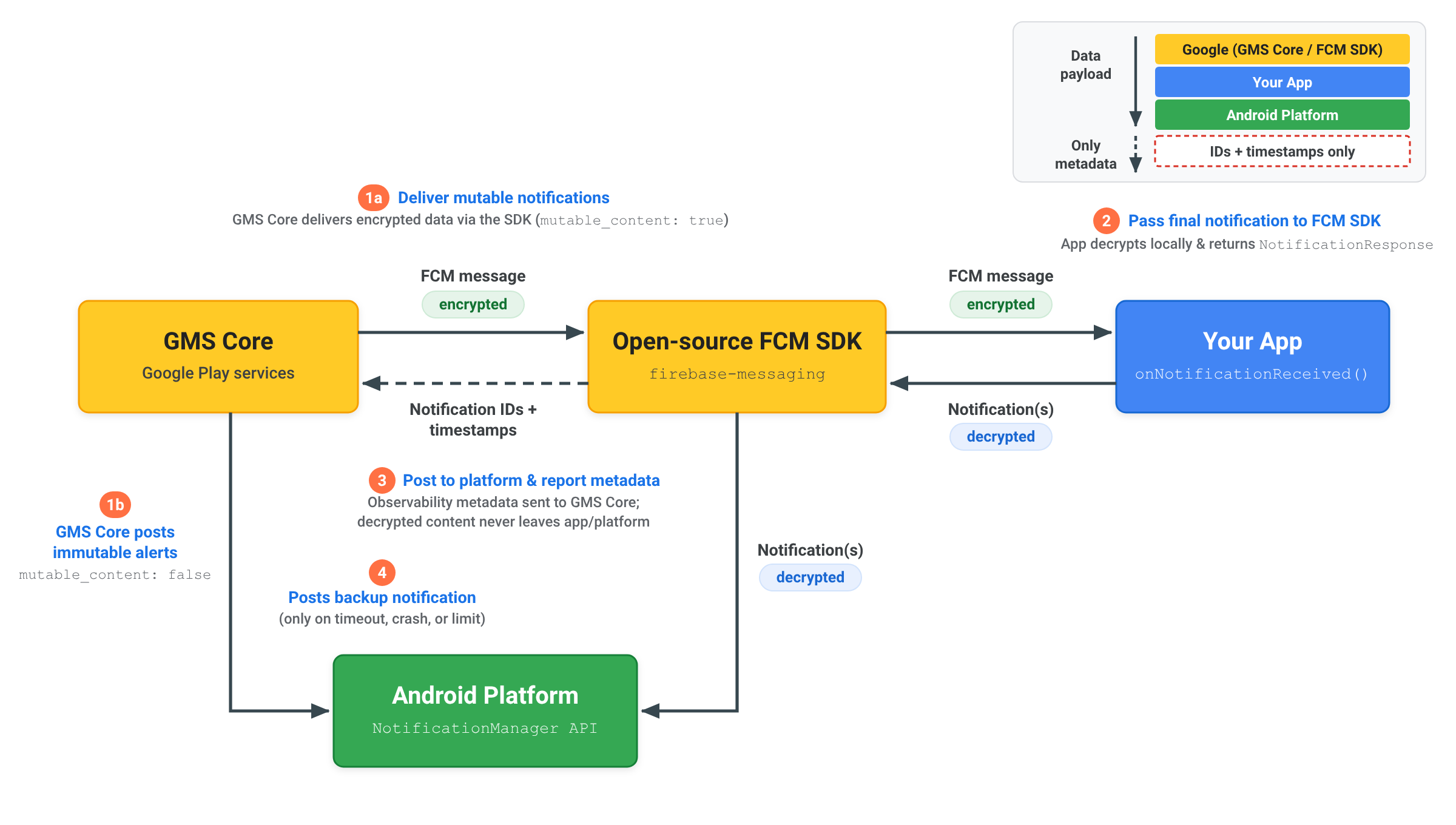
Deliver end-to-end encrypted (E2EE) notifications
When delivering an end-to-end encrypted notification using a
RemoteNotification, decrypted notification
content stays within your app and the Android platform:
- Deliver mutable notification:
Your server sends a
RemoteNotificationwithmutable_content: true, the encrypted payload indata, and a generic unencrypted backupnotification. GMS Core delivers the encrypted message to the open-source FCM SDK inside your app. - Decrypt and return notification: The
FCM SDK invokes
onNotificationReceived(). Your app decrypts the payload locally, builds the final decrypted AndroidNotification, and passes it back to the open-source FCM SDK usingNotificationResponseorFcmNotificationManager. - Post to platform and report metadata: The open source FCM SDK
posts the decrypted notification directly to the Android platform
NotificationManagerAPI and sends only notification metadata, such as notification IDs and timestamps, back to GMS Core for delivery observability. Decrypted content is never sent to GMS Core. - Post backup notification if necessary: Only if your app fails to respond
within the 20 second timeout or exceeds background
suppression limits does GMS Core post the generic backup
notificationdirectly to the Android platform.
Understand notification suppression and timeouts
To maintain reliable delivery across the Android ecosystem, GMS Core applies
processing timeouts and notification suppression limits when handling
RemoteNotification messages:
Processing timeout
When mutable_content is set to true, your onNotificationReceived() method
must return a NotificationResponse within 20 seconds. If
execution exceeds this threshold, the callback is cancelled and GMS Core
automatically posts a fallback notification rendered from the
remote_notification.notification payload.
Notification suppression rate
Since RemoteNotification messages bypass Doze restrictions to alert users
immediately and are delivered without delay, applications are expected to
display notifications for received RemoteNotification messages.
Every application is permitted to suppress up to
25% of its RemoteNotification traffic while running
in the background. If an application's suppression rate exceeds
25%, GMS Core automatically renders and posts a
fallback notification rendered from the remote_notification.notification
payload.
Suppressions performed when the application is active in the foreground don't count toward this threshold. Applications granted unrestricted background usage permissions are also exempt from background suppression limits.